
In Python, strings are a sequence of characters, like the letters, numbers, and symbols you type on your keyboard.
A string in Python can be defined using either single or double quotes.
For instance, both string1 = "Hello, New York!" and string2 = 'Hello, New York!' are valid strings.
Strings in Python act like arrays of bytes, representing unicode characters. This means you can access individual characters in a string using square brackets.
For example, in the string message = "Python", message[0] would return P.
Strings are immutable, meaning once they are created, their values cannot change.
This property allows for safe and consistent handling of text data.
A string can be manipulated in many ways—slicing, formatting, concatenating, and more.
For example, you can join two strings using the plus (+) operator:
greeting = "Hello" + " " + "New York!" will result in greeting being "Hello New York!".
Now, let me show you what is a string in Python with examples.
Strings in Python
Strings in Python are sequences of characters used to store text data. They can be created using single, double, or triple quotes, and once created, they cannot be changed.
Defining a String
In Python, a string is defined by enclosing a sequence of characters in quotes.
Strings can be created using either single quotes (‘) or double quotes (“). For example:
string1 = 'Hello, Chicago!'
string2 = "Hello, Chicago!"
Triple quotes (”’ or “””) can also be used to define strings that span multiple lines:
multi_line_string = '''This is
a multi-line
string'''
By using these different methods, Python allows flexibility in how strings are defined and formatted.
String Immutability
Strings in Python are immutable, meaning once a string is created, it cannot be changed.
This immutability ensures that the data remains consistent throughout the program. To “change” a string, one must create a new string:
original_string = "Hello, World!"
new_string = original_string.replace("World", "Python")
In this example, original_string remains unchanged, and new_string contains the modified text. This characteristic can prevent accidental modifications and bugs in code involving text manipulation.
String Syntax Variations
Python supports various ways to define and use strings, making it versatile for different needs.
Using single or double quotes for simple strings is common. Meanwhile, triple quotes are useful for defining docstrings or multi-line text blocks:
single_quote_string = 'Single quoted string'
double_quote_string = "Double quoted string"
triple_quote_string = """This is a triple quoted string
that spans multiple lines."""
Raw strings, prefixed by r, treat backslashes as literal characters, which is helpful for regular expressions and file paths:
raw_string = r'C:\Users\Name\Documents'By understanding these syntax variations, one can better control and format text in Python programming.
Check out Variables in Python
Working with Strings in Python
Strings in Python can be manipulated in many ways. In this section, I will discuss combining strings, accessing individual characters, slicing, and iterating through strings to perform various operations.
Concatenation and Repetition
String concatenation refers to joining two or more strings end-to-end. In Python, the + operator is used for concatenation.
- Example:
str1 = "Hello"
str2 = "Chicago"
combined = str1 + " " + str2  # "Hello Chicago"
print(combined)
You can see the output in the screenshot below:

Repetition involves duplicating a string multiple times using the * operator.
- Example:
text = "Hi"
repeated_text = text * 3  # "HiHiHi"
Concatenation is useful for creating dynamic messages, while repetition can be used to generate repeated patterns or characters in a string format.
Accessing Characters and Slicing
Individual characters in a string can be accessed using their index. Indexing starts from 0, and negative indices access characters from the end.
- Example:
text = "Python"
first_char = text[0]   # 'P'
last_char = text[-1]   # 'n'
Slicing allows extracting a substring from the original string. Syntax: string[start:stop:step].
- Example:
substring = text[1:4]     # 'yth'
reversed_str = text[::-1] # 'nohtyP'
These techniques allow precise control over string data, which can be beneficial in various programming tasks.
Iterate Over a String
In Python, Iterating over a string means processing each character one by one, often using a loop.
- Example with
forloop:
message = "Hello"
for char in message:
    print(char)
# Output:
# H
# e
# l
# l
# o
This is useful when a program needs to examine or modify individual characters. Iteration provides a way to apply operations to each letter, such as counting characters or validating input.
Check out Python Data Types
Python String Methods
String methods in Python are useful to manipulate and analyze strings. These methods include operations like transforming strings, checking their properties, and splitting or joining them.
Let me explain you a few methods in Strings in Python with examples.
Common String Methods
Common string methods in Python simplify many routine text operations. The len() function, for instance, returns the length of a string.
The split() method divides a string into a list based on a separator. For example, 'apple,banana,orange'.split(',') results in ['apple', 'banana', 'orange'].
Another useful method is join(), which combines elements of a list into a string.
Use it like this: ','.join(['apple', 'banana', 'orange']) to get 'apple,banana,orange'.
The replace() method swaps parts of a string. For example, 'Hello, World!'.replace('Hello', 'Hi') produces 'Hi, World!'.
Moreover, strip() removes whitespace from the beginning and end of a string. ' Hello '.strip() results in Hello.
These methods help in everyday coding tasks.
String Transformation Methods
Transformation methods in Python alter the appearance of strings. The upper() and lower() methods convert letters to uppercase and lowercase, respectively.
For example, 'python'.upper() becomes 'PYTHON', while 'PYTHON'.lower() becomes 'python'.
The capitalize() method transforms the first character to uppercase and makes all other characters lowercase.
'hello WORLD'.capitalize() results in 'Hello world'.
The title() method capitalizes the first letter of each word, like 'hello world'.title() producing 'Hello World'.
The zfill() method pads a string with zeros on the left. If you have '42' and use '42'.zfill(5), it becomes '00042'.
These transformation methods are helpful for formatting text consistently.
String Query Methods
String query methods allow inspection of string properties. The isalpha() method checks if all characters in a string are alphabetic.
'Python'.isalpha() returns True, while 'Python123'.isalpha() returns False.
Similarly, isdigit() checks if all characters are digits. '12345'.isdigit() returns True.
The isspace() method verifies if all characters are whitespace.
For instance, ' '.isspace() returns True, but ' a '.isspace() returns False.
The startswith() and endswith() methods confirm if a string begins or ends with specific characters.
'Hello, World!'.startswith('Hello') returns True, and 'Hello, World!'.endswith('World!') returns True.
These query methods are essential for validating and checking strings.
Read How to Install Python Packages in Visual Studio Code?
Format Strings in Python
In Python, there are several ways to format strings, including the format method, formatted string literals (f-strings), and the old-style % operator. These techniques allow for flexible and readable string handling.
The Format Method
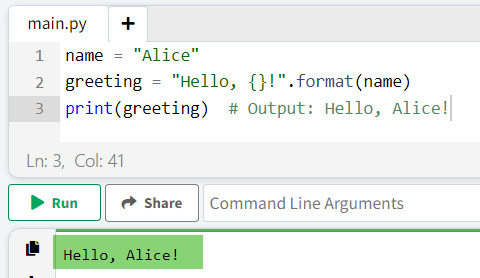
The format method was introduced in Python 3 and uses curly brackets {} as placeholders within a string. The values replace these placeholders passed to the format method.
Example:
name = "Alice"
greeting = "Hello, {}!".format(name)
print(greeting)  # Output: Hello, Alice!
The placeholders can also be numbered to allow for repeated or reordered usage.
print("First: {0}, Second: {1}, Again: {0}".format("A", "B"))
# Output: First: A, Second: B, Again: A
You can see the output in the screenshot below:
Formatted String Literals (f-strings)
Formatted string literals, or f-strings, were introduced in Python 3.6 and have quickly become a preferred way to format strings due to their readability and efficiency. By prefixing a string with f, Python expressions can be embedded directly within the string.
Example:
name = "Bob"
age = 25
print(f"My name is {name} and I am {age} years old.")
# Output: My name is Bob and I am 25 years old.
F-strings also support complex expressions and function calls.
import math
print(f"The value of pi is approximately {math.pi:.2f}")
# Output: The value of pi is approximately 3.14
Old-Style String Formatting (% Operator)
Before format and f-strings, Python used the % operator for string formatting. This method involves using % followed by a format specifier, with the actual values provided in a tuple.
Example:
name = "Carol"
occupation = "Engineer"
print("Name: %s, Occupation: %s" % (name, occupation))
# Output: Name: Carol, Occupation: Engineer
This method can also handle more complex formatting using format specifiers.
number = 7.12345
print("Formatted number: %.2f" % number)
# Output: Formatted number: 7.12
Despite being somewhat outdated, % formatting is still seen in older codebases and serves as a useful method to know for maintaining legacy code.
Check out How to Insert Variables into Strings in Python?
Additional String Features in Python
Strings in Python have many useful features. These include the ability to handle different encodings and include special characters using escape sequences.
String Encoding and Decoding
Strings in Python are often used with different encodings.
Encoding converts a string into bytes, while decoding converts bytes back into a string.
The encode() method is used for encoding, and the decode() method is used for decoding.
For example:
# Encoding a string to bytes
string = "Hello, Python!"
encoded_string = string.encode('utf-8')
print(encoded_string)  # Outputs: b'Hello, Python!'

# Decoding bytes back to string
decoded_string = encoded_string.decode('utf-8')
print(decoded_string)  # Outputs: Hello, Python!
Common encodings include UTF-8 and ASCII.
UTF-8 is widely used because it can represent any character in the Unicode standard.
Escape Characters in Strings
Escape characters allow the insertion of special characters within strings. These are denoted by a backslash (\).
Some common escape characters include \n for new line, \t for tab, and \\ for a backslash.
For example:
# Using escape characters
string = "Hello, \nPython!"
print(string)
# Outputs:
# Hello,
# Python!
These sequences make it possible to format strings in specific ways.
They also allow the inclusion of otherwise tricky characters, like quotes within quotes.
For instance, using \" lets you place double quotes inside a string enclosed by double quotes.
Example of using Python Strings
Python strings can be used in many ways, from simple assignments to complex manipulations. Below are two scenarios that illustrate different uses of strings in Python.
Basic String Assignment and Printing
To begin, assigning and printing strings in Python is straightforward. A string is enclosed in either single or double quotes.
# Creating strings
string1 = "Hello, World!"
string2 = 'Python is fun'
Printing these strings is just as simple:
print(string1)  # Output: Hello, World!
print(string2)  # Output: Python is fun
Strings can be combined using the + operator:
greeting = "Hello, " + string2
print(greeting)  # Output: Hello, Python is fun
Variables can be inserted into strings using f-strings in Python 3.6 and later:
name = "Alice"
message = f"Hello, {name}!"
print(message)  # Output: Hello, Alice!
Complex String Manipulation Examples in Python
Beyond basic assignments, strings can be manipulated in various ways.
For instance, slicing extracts parts of a string.
text = "Python programming"
sub_text = text[0:6]  # Output: Python
Strings can also be repeated using the * operator.
repeat_text = "Hello! " * 3
print(repeat_text)  # Output: Hello! Hello! Hello!
Combining strings and integers requires conversion:
age = 25
message = "I am " + str(age) + " years old."
print(message)  # Output: I am 25 years old.
The join() method can be used to concatenate elements of a list into a single string:
words = ["Python", "is", "awesome"]
sentence = " ".join(words)
print(sentence)  # Output: Python is awesome
Conclusion
Strings in Python are very useful for handling textual data. They are sequences of characters enclosed in quotes. Strings support various operations and methods for text manipulation and analysis.
Due to their immutable nature, strings cannot be changed once created. This ensures data integrity and can lead to more efficient memory usage. Developers can write more efficient and readable code by using string methods and operations like slicing, concatenation, and formatting.
I hope you got an idea of strings in Python with all the above examples.
You may also like:

I’m Michelle Gallagher, a Senior Python Developer at Lumenalta based in New York, United States. I have over nine years of experience in the field of Python development, machine learning, and artificial intelligence. My expertise lies in Python and its extensive ecosystem of libraries and frameworks. Throughout my career, I’ve had the pleasure of working on a variety of projects that have leveraged my skills in Python and machine learning. Read more…