
As a Python enthusiast, I often explore ways to make my code more efficient and reusable. One of the most powerful functionality in Python that helps achieve this is the concept of user-defined functions. If you’re new to programming, then check out this tutorial. Here I will explain everything you need to know about user defined functions in Python, their syntax, usage, and different scenarios with examples.
User defined functions in Python are custom functions created by the programmer to perform specific tasks, enhancing code modularity and reusability. The basic syntax involves using the def keyword followed by the function name and parameters. For instance, a function to add two numbers can be defined as:
def add_numbers(a, b):
    return a + b
This allows you to call add_numbers(5, 3) to get the sum, making your code more organized and easier to manage.
What are User Defined Functions in Python?
In Python, a user-defined function is a block of reusable code that performs a specific task. The user defines these functions to meet the specific needs of their application. They help break down complex problems into smaller, manageable parts, making the code more organized and readable.
Syntax of Python User Defined Functions
The syntax for defining a function in Python is easy. Here’s the basic structure:
def function_name(parameters):
    """docstring"""
    statement(s)
    return expression
Here is the details.
defkeyword: This keyword is used to start the function definition.function_name: This is the name you give to your function.parameters: These are optional and are used to pass values to the function.docstring: A short description of what the function does. It’s optional but highly recommended.statement(s): The block of code that performs the function’s task.returnexpression: This is optional and is used to return a value from the function.
Check out Python Function Examples with Parameters
Examples of a User Defined Function in Python
Let’s look at a simple example to understand how user defined functions work in Python.
Example-1: Basic User Defined Function in Python
Here is a basic user defined function in Python with the complete code.
def greet(name):
    """This function greets the person passed in as a parameter."""
    print(f"Hello, {name}!")

# Calling the function
greet("Alice")
In this example, we defined a function greet that takes one parameter name and prints a greeting message. When we call greet("Alice"), it outputs Hello, Alice!.
Here is the exact output in the screenshot below:

Example-2: User Defined Functions with Multiple Parameters
You can define functions that take multiple parameters. This is useful when you need to perform operations that require more than one input. Here is an example.
def add_numbers(a, b):
    """This function returns the sum of two numbers."""
    return a + b

# Calling the function
result = add_numbers(5, 3)
print(result)  # Output: 8
Example-3: User Defined Functions with Default Parameters
Default parameters allow you to define default values for your function parameters. This is useful when you want your function to have optional parameters.
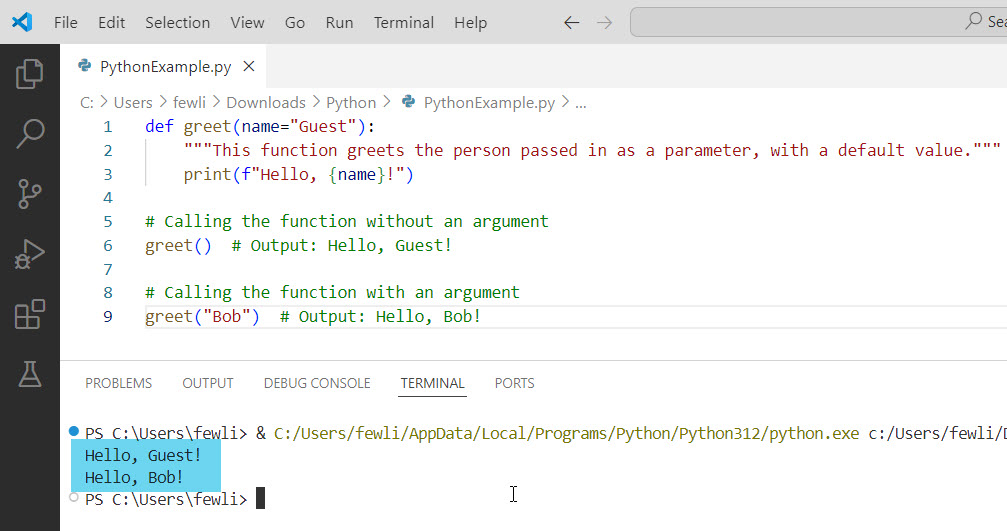
Here is a Python user defined function with default parameters.
def greet(name="Guest"):
    """This function greets the person passed in as a parameter, with a default value."""
    print(f"Hello, {name}!")

# Calling the function without an argument
greet()  # Output: Hello, Guest!

# Calling the function with an argument
greet("Bob")  # Output: Hello, Bob!
Here is the output in the screenshot below:
Check out How to Call a Function in Python?
Example-4: User Defined Functions with Variable-Length Arguments
Sometimes, you may not know in advance how many arguments your user defined function needs to handle. In such cases, you can use *args and **kwargs to allow your function to accept any number of arguments.
def print_numbers(*args):
    """This function prints all the numbers passed as arguments."""
    for number in args:
        print(number)

# Calling the function with multiple arguments
print_numbers(1, 2, 3, 4, 5)
def print_info(**kwargs):
"""This function prints key-value pairs passed as arguments."""
for key, value in kwargs.items():
print(f"{key}: {value}")
# Calling the function with keyword arguments
print_info(name="Alice", age=30, city="New York")Example-5: User Defined Recursive Functions
A recursive function is a function that calls itself. This is useful for solving problems that can be broken down into smaller, similar problems.
def factorial(n):
    """This function returns the factorial of a number."""
    if n == 1:
        return 1
    else:
        return n * factorial(n - 1)

# Calling the recursive function
print(factorial(5))  # Output: 120
Conclusion
As a Python developer, you can write user-defined functions that will help organize code, making it more readable and reusable. In this tutorial, I explained how to define and use functions in Python programming.
I hope this tutorial has provided you with a clear understanding of user defined functions in Python.
You may also like:

I’m Michelle Gallagher, a Senior Python Developer at Lumenalta based in New York, United States. I have over nine years of experience in the field of Python development, machine learning, and artificial intelligence. My expertise lies in Python and its extensive ecosystem of libraries and frameworks. Throughout my career, I’ve had the pleasure of working on a variety of projects that have leveraged my skills in Python and machine learning. Read more…