
Do you want to know about the strip() function in Python? In this tutorial, I will explain how to work with the strip function in Python.
What is the strip Function in Python?
The strip function is a built-in Python method used to remove specified characters from the beginning and end of a string. By default, it removes whitespace characters such as spaces, tabs, and newlines. This function is particularly useful when you need to clean up user input or format strings before processing them further.
Syntax of the strip Function
The syntax for the strip function is like below:
string.strip([chars])string: The original string from which you want to remove characters.chars(optional): A string specifying the set of characters to be removed. If omitted, thestripfunction removes whitespace characters by default.
Check out Average Function in Python
How to Use the Strip Function in Python
Now, let me show you some real examples of using the strip function in Python.
Example 1: Remove Whitespace
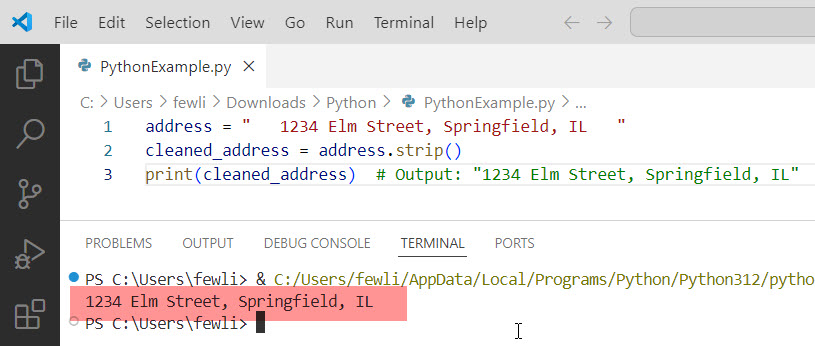
One of the most common uses of the strip function in Python is to remove leading and trailing whitespace from a string. For instance, consider the following example:
address = "   1234 Elm Street, Springfield, IL   "
cleaned_address = address.strip()
print(cleaned_address)  # Output: "1234 Elm Street, Springfield, IL"
In this example, the strip function removes the extra spaces from the beginning and end of the address string.
Here is the exact output you can see in the screenshot below:
Example 2: Remove Specific Characters
You can also use the strip function to remove specific characters from the start and end of a string. For example, if you have a string with unwanted characters:
filename = "###report_2024.pdf###"
cleaned_filename = filename.strip("#")
print(cleaned_filename)  # Output: "report_2024.pdf"
Here, the strip function removes the # characters from both ends of the filename.
Example 3: Combine strip with Other String Methods
The strip function can be combined with other string methods in Python to achieve more complex string manipulations. For example, you might want to remove specific characters and convert the string to lowercase:
name = "  John Doe  "
cleaned_name = name.strip().lower()
print(cleaned_name)  # Output: "john doe"
This example first removes the leading and trailing spaces and then converts the cleaned string to lowercase.
You can check out the exact output in the screenshot below:

Example 4: Remove Multiple Characters
If you need to remove multiple different characters, you can pass a string containing all the characters to be removed:
data = "*&$Hello, World!$&*"
cleaned_data = data.strip("*&$")
print(cleaned_data)  # Output: "Hello, World!"
In this case, the strip function removes the *, &, and $ characters from both ends of the string.
Check out POP() Function in Python
Example 5: Clean User Input
Let’s consider a practical example where you might use the strip function to clean user input in a web application. Suppose you have a form where users enter their names, and you want to ensure that the input is clean before storing it in your database:
def clean_user_input(user_input):
    return user_input.strip().title()

raw_name = "   alice johnson   "
cleaned_name = clean_user_input(raw_name)
print(cleaned_name)  # Output: "Alice Johnson"
In this example, the clean_user_input function removes any leading and trailing whitespace and converts the name to title case, ensuring consistent formatting.
Here is the output in the screenshot below:

Conclusion
The strip function in Python is used to format strings. Whether you’re removing whitespace, specific characters, or preparing user input for storage, the strip function can help you achieve this. I have also shown a few real examples of how to use the Python strip() function.
You may also like:

I’m Michelle Gallagher, a Senior Python Developer at Lumenalta based in New York, United States. I have over nine years of experience in the field of Python development, machine learning, and artificial intelligence. My expertise lies in Python and its extensive ecosystem of libraries and frameworks. Throughout my career, I’ve had the pleasure of working on a variety of projects that have leveraged my skills in Python and machine learning. Read more…