
Recently, I was required to maintain some form of state or configuration that is common to all objects of a class in Python. Static variables are the best option for this. In this tutorial, I will show you how to use static variables in Python with some real examples.
Static variables in Python, also known as class variables, are shared among all instances of a class and are defined within the class but outside any instance methods. They are useful for maintaining consistent state or configuration across all objects, such as tracking the total number of cars sold in a dealership system or managing global settings like default timezones in a web application. Static variables help ensure memory efficiency and consistency across instances.
What are Static Variables in Python?
A static variable in Python, also known as a class variable, is a variable that is shared among all instances of a class. Unlike instance variables, which are unique to each object, static variables maintain a single shared state across all objects of the class. This makes them ideal for storing data that should be consistent across all instances.
Declare Python Static Variables
In Python, static variables are declared within the class but outside any instance methods. Here’s a simple example to illustrate this:
class Car:
    # Static variable
    number_of_wheels = 4

    def __init__(self, make, model):
        self.make = make
        self.model = model

# Accessing static variable
print(Car.number_of_wheels)  # Output: 4
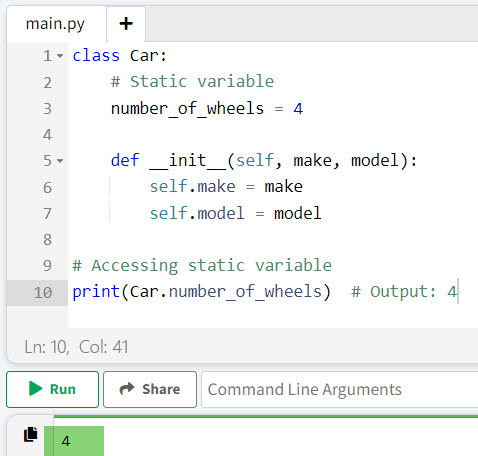
In this example, number_of_wheels is a static variable shared by all instances of the Car class.
I executed the above Python code, and you can see the output:
Next, as a Python developer, you should understand why you should use static variables.
Also, check out Create Dynamic Variables in Python
Why Use Static Variables in Python?
Static variables are useful in scenarios where you need to maintain a consistent state or configuration across all instances of a class in Python. Here are a few reasons why you might use static variables in Python:
- Memory Efficiency: Static variables help save memory by storing a single copy of the variable shared among all instances.
- Consistency: They ensure that a particular attribute remains consistent across all instances.
- Global State: Useful for maintaining global state or configuration that applies to all objects.
Static Variables in Python – Practical Examples
Now, let me show you a few real examples of how to use Static Variables in Python to better understand the use of static variables.
Example 1: Tracking Total Number of Cars Sold
Suppose you are developing a software system for a car dealership to track the total number of cars sold. You can use a static variable to keep track of this count.
Below is the complete Python code.
class Car:
    total_cars_sold = 0

    def __init__(self, make, model):
        self.make = make
        self.model = model
        Car.total_cars_sold += 1

# Selling cars
car1 = Car("Toyota", "Camry")
car2 = Car("Honda", "Civic")
car3 = Car("Ford", "Mustang")

print(f"Total cars sold: {Car.total_cars_sold}")  # Output: Total cars sold: 3
In this example, total_cars_sold is a static variable that increments every time a new car object is created, giving us the total number of cars sold.
You can see the output in the screenshot below after I executed the above Python code.

Example 2: Managing Configuration Settings
Imagine you are developing a web application for a US-based company. You might need a configuration setting that applies to all users, such as the default timezone.
Below is the complete Python program to understand how to use static variables.
class Config:
    default_timezone = "America/New_York"

    @staticmethod
    def change_timezone(new_timezone):
        Config.default_timezone = new_timezone

# Accessing and modifying static variable
print(Config.default_timezone)  # Output: America/New_York
Config.change_timezone("America/Los_Angeles")
print(Config.default_timezone)  # Output: America/Los_Angeles
Here, default_timezone is a static variable that can be accessed and modified using a static method. This ensures that the timezone setting is consistent across the application.
Example 3: Counting Instances of a Class
Another common use case is to count the number of instances of a class. For instance, you might be developing an application to manage a fleet of delivery trucks.
class DeliveryTruck:
    total_trucks = 0

    def __init__(self, id):
        self.id = id
        DeliveryTruck.total_trucks += 1

# Creating delivery trucks
truck1 = DeliveryTruck(101)
truck2 = DeliveryTruck(102)
truck3 = DeliveryTruck(103)

print(f"Total delivery trucks: {DeliveryTruck.total_trucks}")  # Output: Total delivery trucks: 3
In this example, total_trucks is a static variable that keeps track of the total number of delivery truck instances created.
Conclusion
Static variables in Python are used for managing shared data across instances of a class. They are particularly useful for maintaining global state, configuration settings, and tracking information that should be consistent across all objects.
Here, in this tutorial, I have explained how to use static variables in Python with three examples. Still have questions? Feel free to leave a comment below and I will reply ASAP.
You may also like the following tutorials:
- Create Multiple Variables in a For Loop in Python
- How to Print A Variable in Python?
- How to Use Static Variables in Functions in Python?
- Local and Global Variables in Python
- How to Access a Local Variable Outside a Function in Python Without Using global?

I’m Michelle Gallagher, a Senior Python Developer at Lumenalta based in New York, United States. I have over nine years of experience in the field of Python development, machine learning, and artificial intelligence. My expertise lies in Python and its extensive ecosystem of libraries and frameworks. Throughout my career, I’ve had the pleasure of working on a variety of projects that have leveraged my skills in Python and machine learning. Read more…