
Someone in a Python group session asked me about using static variables in Python functions. Python doesn’t have built-in support for static variables inside a function. But there are different ways to achieve this. In this tutorial, I will explain how to use static variables in functions in Python.
In Python, you can create static variables in a function using function attributes. This involves checking if the function has a particular attribute, initializing it if it doesn’t exist, and then updating it within the function. For example:
def my_function():
    if not hasattr(my_function, "counter"):
        my_function.counter = 0  # Initialize the static variable
    my_function.counter += 1
    print(f"Counter: {my_function.counter}")

my_function()  # Output: Counter: 1
my_function()  # Output: Counter: 2
Here, counter acts as a static variable that retains its value between function calls.
What Are Static Variables?
Static variables are variables that maintain their value between function calls. In other words, they are persistent and retain their state across different function invocations. This can be incredibly useful for tasks that require some form of state management without using global variables.
Create Static Variables in Python
Python doesn’t have a direct way to declare static variables inside a function, but we can achieve similar functionality using a few different methods. Here are some common ways to create static variables in Python functions:
Using Function Attributes
One of the simplest ways to create a static variable in a Python function is by using function attributes. Here’s how you can do it:
def my_function():
    if not hasattr(my_function, "counter"):
        my_function.counter = 0  # Initialize the static variable
    my_function.counter += 1
    print(f"Counter: {my_function.counter}")

# Test the function
my_function()  # Output: Counter: 1
my_function()  # Output: Counter: 2
my_function()  # Output: Counter: 3
In this example, the counter attribute is used to keep track of the number of times the function has been called. This attribute retains its value between function calls, effectively acting as a static variable.
You can see the exact output in the screenshot below:

Using Default Mutable Arguments
Another way to create static variables is by using default mutable arguments in Python. This method is less common but can be useful in certain scenarios:
def my_function(counter=[0]):
    counter[0] += 1
    print(f"Counter: {counter[0]}")

# Test the function
my_function()  # Output: Counter: 1
my_function()  # Output: Counter: 2
my_function()  # Output: Counter: 3
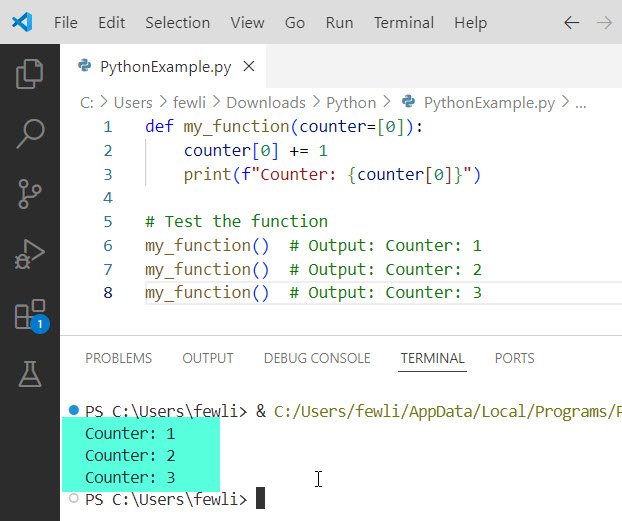
In this example, the counter variable is initialized as a list with a single element. Because lists are mutable, the counter retains its state between function calls.
Here is the output in the screenshot below:
Check out How to Call the Main Function in Python?
Scenarios for Using Static Variables in Python
Static variables can be beneficial in various scenarios, such as:
- Counting Function Calls: As shown in the examples above, static variables can count how many times a function has been called.
- Caching Results: If a function performs an expensive computation, you can use static variables to cache the results and avoid redundant calculations.
- State Management: Static variables can help manage the state when using global variables is inappropriate.
Conclusion
While Python doesn’t natively support static variables inside functions, you can mimic their behavior using function attributes or default mutable arguments. These techniques can help you manage state more effectively in your Python programs. In this tutorial, I explained how to create static variables in a function in Python.
You may also like the following tutorials:
- Run a Python Function from the Command Line
- Python Functions vs Methods
- How to Call a Function by String in Python?

I’m Michelle Gallagher, a Senior Python Developer at Lumenalta based in New York, United States. I have over nine years of experience in the field of Python development, machine learning, and artificial intelligence. My expertise lies in Python and its extensive ecosystem of libraries and frameworks. Throughout my career, I’ve had the pleasure of working on a variety of projects that have leveraged my skills in Python and machine learning. Read more…