
Recently, someone asked me how to set a variable to null in Python. There are various methods to do this. In this tutorial, I will show you how to set a variable to null in Python with examples.
To set a variable to null in Python, you simply assign it the value None. This is done using the assignment operator =. For example, my_variable = None sets my_variable to null. The None keyword represents the absence of a value and is commonly used for initializing variables, default function parameters, and placeholders for future data.
Null in Python
In Python, the equivalent of null is None. The None keyword is used to define a null value or no value at all. It is an object of its own datatype, the NoneType. This makes None a unique and immutable object in Python.
Why Use None in Python?
Using None is crucial in situations where you need to initialize a variable to a value that signifies “nothing” or “no value.” This can be particularly useful in the following scenarios:
- Default Parameter Values: When you want to provide a default value for a function parameter.
- Conditional Checks: When you need to check if a variable has been assigned a value.
- Placeholder for Future Data: When you are setting up a data structure but don’t have the actual data yet.
Set a Variable to Null in Python
Now, let me show you how to set a variable to null in Python with examples.
1. Basic Assignment
The best way to set a variable to null in Python is by assigning it to None.
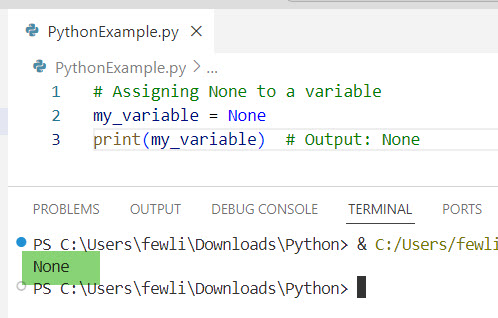
# Assigning None to a variable
my_variable = None
print(my_variable)  # Output: None
Here is the output in the screenshot below:
Check out How to Check if a Variable is Null in Python?
2. Using None in Functions
You can use None as a default value for function parameters. This is particularly useful when you want to make arguments optional.
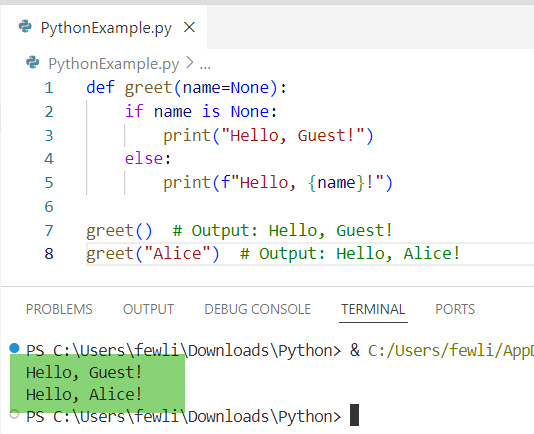
def greet(name=None):
    if name is None:
        print("Hello, Guest!")
    else:
        print(f"Hello, {name}!")

greet()  # Output: Hello, Guest!
greet("Alice")  # Output: Hello, Alice!
Here is the output in the screenshot below:
3. Check for None in Python
To check if a variable is None, you can use the is keyword. This is the preferred way because it checks for object identity.
my_variable = None

if my_variable is None:
    print("Variable is None")
else:
    print("Variable has a value")
The output is in the screenshot below after I executed the above Python code.

Read How to Change the Value of a Variable in Python?
Set a Variable to Null in Python: Examples
Now, let me show you some real examples of how to set a variable to null in Python.
Example 1: User Input Validation
Consider a scenario where you are developing a web application for a DMV (Department of Motor Vehicles) in the USA. You might want to validate user input to check if a field has been left empty.
def validate_input(user_input):
    if user_input is None or user_input.strip() == "":
        return "Input cannot be empty."
    else:
        return "Input is valid."

# Example usage
user_input = None
print(validate_input(user_input))  # Output: Input cannot be empty.

user_input = "  "
print(validate_input(user_input))  # Output: Input cannot be empty.

user_input = "Driver's License"
print(validate_input(user_input))  # Output: Input is valid.
Here is the output in the screenshot below:

Example 2: Database Query Results
When querying a database, you might encounter situations where certain fields can be null. For example, if you are querying a database of US cities and some cities might not have a recorded population.
def get_city_population(city_name):
    # Simulate a database query result
    city_population = {
        "New York": 8419000,
        "Los Angeles": 3980000,
        "Chicago": None  # Population data not available
    }
    population = city_population.get(city_name, None)

    if population is None:
        return f"Population data for {city_name} is not available."
    else:
        return f"The population of {city_name} is {population}."

# Example usage
print(get_city_population("New York"))  # Output: The population of New York is 8419000.
print(get_city_population("Chicago"))  # Output: Population data for Chicago is not available.
Conclusion
In Python, the None keyword is used to represent null values. In this tutorial, I have explained how to set a variable to null in Python using different methods with examples.
If you still have any questions? Feel free to ping me in the comments below.

I’m Michelle Gallagher, a Senior Python Developer at Lumenalta based in New York, United States. I have over nine years of experience in the field of Python development, machine learning, and artificial intelligence. My expertise lies in Python and its extensive ecosystem of libraries and frameworks. Throughout my career, I’ve had the pleasure of working on a variety of projects that have leveraged my skills in Python and machine learning. Read more…