
Hey everyone! Today, I want to share my experience with one of the most common errors in Python that I encountered recently: the “Python variable not defined” error. Let me explain the common causes and how to fix the error.
What is a “Variable Not Defined” Error in Python?
In Python, a “variable not defined” error, also known as a NameError, occurs when you try to use a variable that hasn’t been defined yet. This means that Python doesn’t recognize the variable name because it hasn’t been assigned a value.
Here’s a simple example to understand this:
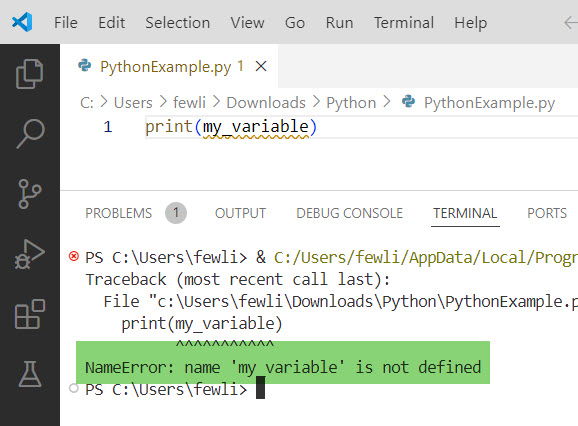
print(my_variable)Running this code will give you an error:
NameError: name 'my_variable' is not definedYou can even see the error message in the screenshot below:
Python Variable Not Defined [Causes and Solutions]
Now let me show you a few causes and solutions to fix the error: nameerror name is not defined
1. Misspelled Variable Names
One of the most common causes is a typo in the variable name in Python. For instance:
myVariable = 10
print(myVarible)
In this case, myVarible is misspelled. The correct variable name is myVariable.
Solution: Double-check your variable names for typos.
2. Variable Scope
Another common cause is variable scope. Variables defined inside a function are local to that function and cannot be accessed outside of it.
def my_function():
    my_variable = 10

print(my_variable)
This will also raise a NameError because my_variable is defined within my_function and is not accessible outside of it.
Solution: Define the variable in the appropriate scope or pass it as an argument to the function if necessary.
def my_function():
    my_variable = 10
    return my_variable

my_variable = my_function()
print(my_variable)
3. Using Variables Before Assignment
Sometimes, you might try to use a Python variable before assigning a value to it. Like the below:
print(my_variable)
my_variable = 10
This will raise a NameError because my_variable is used before it is defined.
Solution: Ensure you assign a value to the variable before using it.
my_variable = 10
print(my_variable)
4. Global vs. Local Variables
If you’re working with global variables, you need to use the global keyword inside functions to modify them.
my_variable = 10

def my_function():
    global my_variable
    my_variable = 20

my_function()
print(my_variable)
Without the global keyword, Python will treat my_variable as a local variable inside my_function.
A Real-World Example
Let me walk you through a real-world example I encountered. I was working on a simple game where the player has a certain number of lives. Here’s a snippet of my initial code:
def main():
    print(lives)

main()
lives = 3
Running this code gave me a NameError:
NameError: name 'lives' is not definedDebugging the Issue
- Check Variable Assignment:
I realized that I was trying to printlivesbefore it was assigned a value. The assignmentlives = 3happens after themain()function is called. - Fix the Order of Execution:
To fix this, I moved the assignment before the function call.
lives = 3

def main():
    print(lives)

main()
This resolved the error, and the program worked as expected:
3Conclusion
I hope you can fix the “Python Variable Not Defined” error you might receive while working with Python programming. There can be many reasons the error will appear, like checking for typos, ensuring variables are defined in the correct scope, and assigning values before using them. But I hope you can now fix it.
You may also like:
- Python Module Not Found After Pip Install
- How to Install Multiple Versions of Python?
- How to Install a Python Package from GitHub?
- How to Install a Specific Version of a Package in Python?

I’m Michelle Gallagher, a Senior Python Developer at Lumenalta based in New York, United States. I have over nine years of experience in the field of Python development, machine learning, and artificial intelligence. My expertise lies in Python and its extensive ecosystem of libraries and frameworks. Throughout my career, I’ve had the pleasure of working on a variety of projects that have leveraged my skills in Python and machine learning. Read more…