
Today’s topic is tricky, and I will show you here how to print variable name instead of value in Python. There are different methods to do it.
To print a variable name instead of its value in Python, you can use f-strings (available from Python 3.6 onwards). By prefixing the string with f and enclosing the variable name in curly braces, you can display both the name and value. For example, price = 9.99; print(f"{price=}") will output price=9.99, showing the variable name and its value.
Print Variable Name Instead of Value in Python
In Python, when you print a variable, it displays the value stored in that variable. But what if you want to print the variable name itself instead of its value? There are several ways to accomplish this in Python. Let me show you examples one by one.
Method 1: Using f-strings
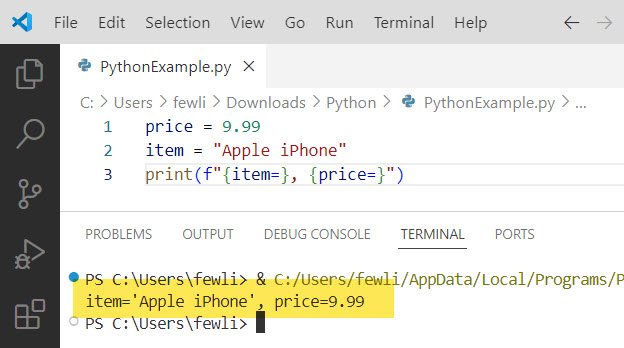
Starting with Python 3.6, f-strings provide a convenient way to print variable names and values. By prefixing the string with f and enclosing the variable name in curly braces, you can display both the name and value. For example:
price = 9.99
item = "Apple iPhone"
print(f"{item=}, {price=}")
Output:
item='Apple iPhone', price=9.99I executed the above Python code, and you can see the output in the screenshot below:
Method 2: Using the inspect module
Python’s built-in inspect module allows you to obtain information about live objects, including variable names. You can define a function that uses inspect.currentframe() to get the caller’s frame and inspect.getframeinfo() to retrieve the variable name. Here’s an example:
import inspect

def get_var_name(var):
    callers_local_vars = inspect.currentframe().f_back.f_locals.items()
    return [var_name for var_name, var_val in callers_local_vars if var_val is var]

distance = 25.5
unit = "miles"
print(f"The {get_var_name(unit)[0]} traveled is {distance} {unit}.")
Output:
The unit traveled is 25.5 miles.Method 3: Using a dictionary
Another approach is to store variable names and their corresponding values in a Python dictionary. You can then iterate over the dictionary and print the variable names. Here’s an example:
variables = {}

def print_var_name(name, value):
    variables[name] = value
    print(f"{name}: {value}")

first_name = "John"
last_name = "Doe"
age = 30

print_var_name("first_name", first_name)
print_var_name("last_name", last_name)
print_var_name("age", age)
Output:
first_name: John
last_name: Doe
age: 30
Check out Check if a Variable is an Integer in Python
Method 4: Using the globals() Function
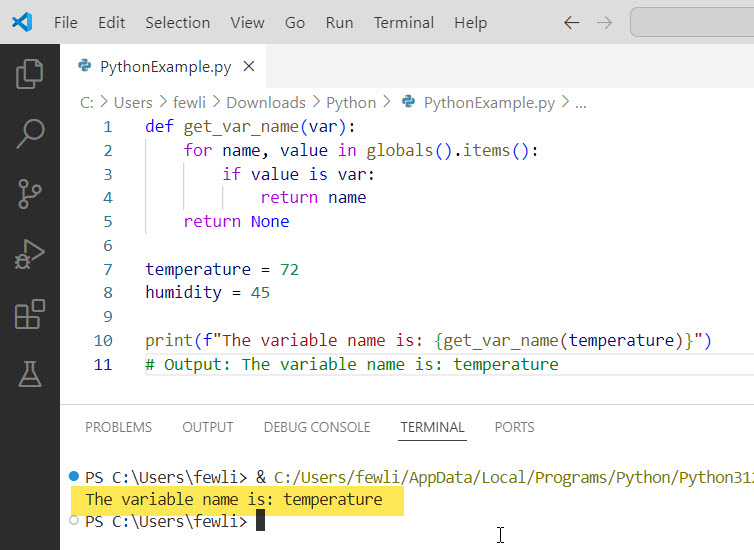
The globals() function in Python returns a dictionary representing the current global symbol table. This can be used to find the variable name by comparing values. Let me show you an example.
def get_var_name(var):
    for name, value in globals().items():
        if value is var:
            return name
    return None

temperature = 72
humidity = 45

print(f"The variable name is: {get_var_name(temperature)}")
# Output: The variable name is: temperature
You can see the output in the screenshot below:
Method 5: Using a Custom Class
You can create a custom class that tracks variable names in Python. This method is useful for more complex applications that manage multiple variables dynamically.
Here is an example.
class Variable:
    def __init__(self, name, value):
        self.name = name
        self.value = value

    def __repr__(self):
        return f"{self.name} = {self.value}"

temperature = Variable('temperature', 72)
humidity = Variable('humidity', 45)

print(f"The variable name is: {temperature.name}")
# Output: The variable name is: temperature
Conclusion
In this tutorial, I explained how to print variable name instead of value in Python using different methods like:
- Using f-strings
- Using the inspect module
- Using a dictionary
- Using the globals() Function
- Using a Custom Class
You may also like the following tutorials:

I’m Michelle Gallagher, a Senior Python Developer at Lumenalta based in New York, United States. I have over nine years of experience in the field of Python development, machine learning, and artificial intelligence. My expertise lies in Python and its extensive ecosystem of libraries and frameworks. Throughout my career, I’ve had the pleasure of working on a variety of projects that have leveraged my skills in Python and machine learning. Read more…