
Recently, I was teaching Python to someone and explained different methods to print a variable in Python. In this tutorial, I will show you how to print a variable in Python using different methods with real examples.
To print a variable in Python using the basic print() function, simply pass the variable as an argument to print(). For example, if you have a variable name with the value "John", you can print it by writing print(name), which will output John. This method is easy for displaying the value of a single variable.
print() Function in Python
The print() function in Python is used to output text or variables to the console. It’s one of the most commonly used functions and is used for displaying information in Python.
Check Variables in Python
Print A Variable in Python
Now, let me show you how to use the print() function to print a variable in Python using different examples. I will start with basic printing examples in Python.
1. Basic Printing of Variables
Suppose you have a variable name , and you want to print it. Here is an example of a basic print of a variable in Python.
name = "John"
print(name)
This will output:
John2. Use F-Strings for Formatting before Printing
F-Strings, introduced in Python 3.6, provides embed expressions inside string literals. They are prefixed with an f and use curly braces {} to evaluate variables.
Here is a complete Python example
name = "John"
age = 30
print(f"My name is {name} and I am {age} years old.")
This will output:
My name is John and I am 30 years old.F-Strings are particularly useful for complex expressions and can even handle inline calculations. Here is an example.
price = 19.99
quantity = 3
total = price * quantity
print(f"The total price for {quantity} items is ${total:.2f}.")
This will output:
The total price for 3 items is $59.97.I executed the above Python code, and you can see the output in the screenshot below:

Here is another example to understand it a little better way.
Below is an example of how to print basic information using the Python print function.
first_name = "Jessica"
last_name = "Smith"
age = 28
city = "Chicago"
print(f"My name is {first_name} {last_name}, I am {age} years old, and I live in {city}.")
This will output:
My name is Jessica Smith, I am 28 years old, and I live in Chicago.Check out Local and Global Variables in Python
3. The format() Method
The format() method is another way to format strings while printing a variable in Python. It allows you to insert variables into a string at specified positions. Let me show you an example.
name = "Emily"
city = "New York"
print("Hello, my name is {} and I live in {}.".format(name, city))
This will output:
Hello, my name is Emily and I live in New York.You can see the output in the screenshot below after I executed the above Python code.

You can also use positional and keyword arguments with format():
print("Hello, my name is {0} and I live in {1}.".format(name, city))
print("Hello, my name is {name} and I live in {city}.".format(name=name, city=city))
Here is another example if you want to print a variable in a new line in Python.
product_name = "Laptop"
brand = "Dell"
price = 999.99
print("Product: {}\nBrand: {}\nPrice: ${:.2f}".format(product_name, brand, price))
This will output:
Product: Laptop
Brand: Dell
Price: $999.99
4. Concatenation with the + Operator
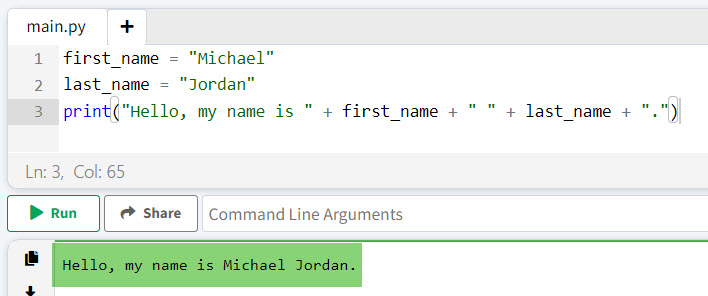
String concatenation using the + operator is another method to print variables in Python. However, it can be less readable, especially with multiple variables. Here is an example to understand it better.
first_name = "Michael"
last_name = "Jordan"
print("Hello, my name is " + first_name + " " + last_name + ".")
This will output:
Hello, my name is Michael Jordan.Here is the output in the screenshot below:
Check out Create Multiple Variables in a For Loop in Python
5. Printing Multiple Variables
You can print multiple variables by separating them with commas in the print() function in Python. This method automatically adds a space between the variables. Here is an example to understand it better.
state = "California"
population = 39538223
print("The state of", state, "has a population of", population, "people.")
This will output:
The state of California has a population of 39538223 people.Conclusion
In this tutorial, I have shown you various methods to print variables in Python, including basic printing, F-Strings, the format() method, and concatenation with the + operator. I have explained with examples, how we can use the print() function in Python efficiently. Still have questions? Feel free to drop me a comment below.
You may like the following tutorials:
- How to Print String and Variable in Python?
- Python local variable referenced before assignment
- How to Print Variable Names in a For Loop in Python?

I’m Michelle Gallagher, a Senior Python Developer at Lumenalta based in New York, United States. I have over nine years of experience in the field of Python development, machine learning, and artificial intelligence. My expertise lies in Python and its extensive ecosystem of libraries and frameworks. Throughout my career, I’ve had the pleasure of working on a variety of projects that have leveraged my skills in Python and machine learning. Read more…