
As a Python developer, you might have come across lambda functions. These small, anonymous functions can pack quite a punch when used correctly. In this tutorial, I’ll walk you through how to use a lambda function in Python with an if condition with some examples.
A lambda function in Python can be used with an if condition to filter data efficiently. For example, to separate even and odd numbers from a list, you can use the filter() function with a lambda expression: even_numbers = list(filter(lambda x: x % 2 == 0, numbers)) and odd_numbers = list(filter(lambda x: x % 2 != 0, numbers)). This allows you to quickly and concisely process and categorize your data based on the specified condition.
What is a Lambda Function?
A lambda function in Python is a small anonymous function that is defined using the lambda keyword. Unlike regular functions that are defined using the def keyword, lambda functions are typically used for short, throwaway functions that are not intended to be reused multiple times. They are often used in situations where a simple function is required for a short period of time.
Syntax of Lambda Function with If Condition
The syntax for lambda functions is quite straightforward. Here’s the general format:
lambda arguments: expressionWhen incorporating an if condition, the syntax becomes:
lambda arguments: expression_if_true if condition else expression_if_falsePython Lambda Function with If Condition Examples
Let’s start with a basic example. Suppose we want to create a lambda function that returns the square of a number if it is even, and the cube of the number if it is odd.
square_or_cube = lambda x: x**2 if x % 2 == 0 else x**3In this case, square_or_cube(4) would return 16 because 4 is even, and square_or_cube(3) would return 27 because 3 is odd.
Now, let me show you some other examples and scenarios of using the if condition in the Python lambda function.
1. Filter Data
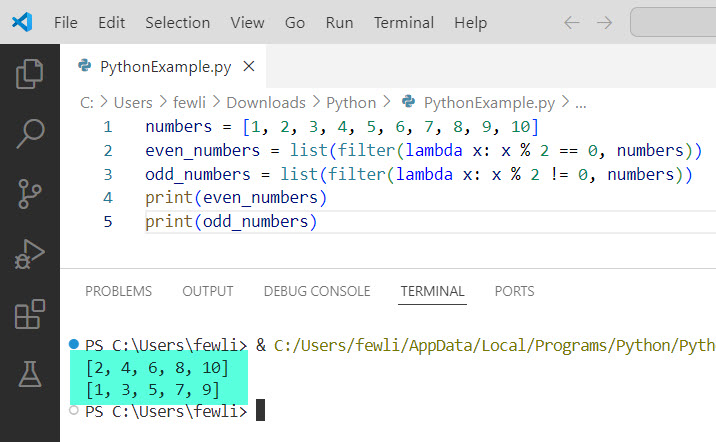
Lambda functions are often used with functions like filter(), map(), and reduce(). For instance, let’s filter a list of numbers to separate even and odd numbers:
numbers = [1, 2, 3, 4, 5, 6, 7, 8, 9, 10]
even_numbers = list(filter(lambda x: x % 2 == 0, numbers))
odd_numbers = list(filter(lambda x: x % 2 != 0, numbers))
print(even_numbers)
print(odd_numbers)
You can see the output in the screenshot below:
2. Sort with Custom Key
You can use a lambda function with an if condition to sort a list based on a custom key. For example, sorting a list of tuples by the second value, but prioritizing even numbers:
data = [(1, 3), (2, 2), (3, 1), (4, 4)]
sorted_data = sorted(data, key=lambda x: (x[1] % 2, x[1]))
3. Conditional Mapping
Map a list of numbers to their respective string representations of “Even” or “Odd”:
numbers = [1, 2, 3, 4, 5, 6, 7, 8, 9, 10]
mapped_numbers = list(map(lambda x: "Even" if x % 2 == 0 else "Odd", numbers))
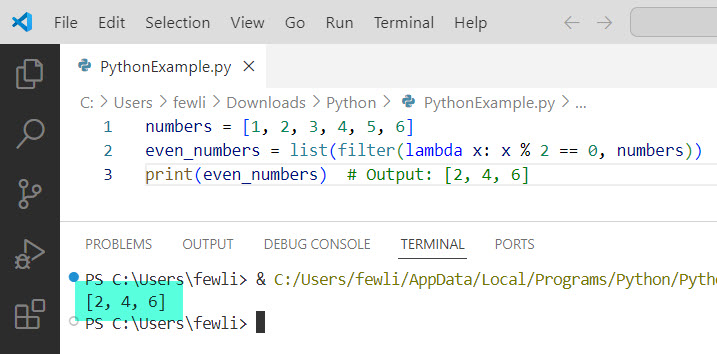
Let’s look at an example where we use a lambda function to filter out even numbers from a list:
numbers = [1, 2, 3, 4, 5, 6]
even_numbers = list(filter(lambda x: x % 2 == 0, numbers))
print(even_numbers)  # Output: [2, 4, 6]
In this example, filter() applies the lambda function to each element in the numbers list and returns only those elements for which the lambda function returns True.
You can see the output in the screenshot below:
4. Using with Pandas
In data analysis with Pandas, lambda functions can be particularly useful. For instance, applying a conditional transformation to a DataFrame column:
import pandas as pd

data = {'numbers': [1, 2, 3, 4, 5, 6, 7, 8, 9, 10]}
df = pd.DataFrame(data)
df['type'] = df['numbers'].apply(lambda x: 'Even' if x % 2 == 0 else 'Odd')
Conclusion
In this tutorial, I explained how to use lambda functions in Python with if condition with some examples.
You may also like:

I’m Michelle Gallagher, a Senior Python Developer at Lumenalta based in New York, United States. I have over nine years of experience in the field of Python development, machine learning, and artificial intelligence. My expertise lies in Python and its extensive ecosystem of libraries and frameworks. Throughout my career, I’ve had the pleasure of working on a variety of projects that have leveraged my skills in Python and machine learning. Read more…