
Recently, one of my team members tried to create multiple variables in Python, so I suggested a slightly advanced approach. In this tutorial, I will show you how to create multiple variables in a for loop in Python using different methods and examples.
To create multiple variables in a Python for loop, you can iterate over a list of tuples, where each tuple contains the variables you want to manage. For example, with a list like states_and_capitals = [("California", "Sacramento"), ("Texas", "Austin")], you can use for state, capital in states_and_capitals: to unpack each tuple into the state and capital variables, enabling you to process both simultaneously within the loop.
Create Multiple Variables in a For Loop in Python
Now, let me show you different methods to create multiple variables in a for loop in Python. We will start with a simple one.
1. Basic for Loop with Multiple Variables
The simplest way to create multiple variables in a for loop in Python is by iterating over a list of tuples. Each tuple contains the variables you want to manage. Let me show you an example.
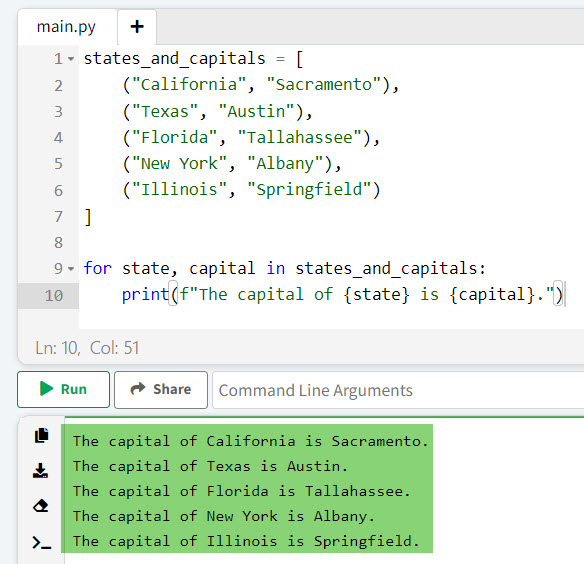
Suppose we have a list of tuples containing the names of states and their capitals. We can iterate over this list and create two variables, state and capital, in each iteration. Here is the complete Python code.
states_and_capitals = [
    ("California", "Sacramento"),
    ("Texas", "Austin"),
    ("Florida", "Tallahassee"),
    ("New York", "Albany"),
    ("Illinois", "Springfield")
]

for state, capital in states_and_capitals:
    print(f"The capital of {state} is {capital}.")
In this example, the for loop iterates over each tuple in the states_and_capitals list, unpacking the values into state and capital variables.
I executed the above Python code, and you can see the output in the screenshot below:
Check out Create Dynamic Variables in Python
2. Using enumerate()
Let me show you the second method for creating multiple variables in a for loop in Python: the enumerate() method.
The enumerate() function adds a counter to an iterable, allowing you to keep track of the index while iterating. This is useful when you need both the index and the value from the iterable.
Here is an example and Python code.
Let’s consider a list of states along with their populations. We want to print the rank of each state based on its population.
states = ["California", "Texas", "Florida", "New York", "Illinois"]
populations = [39538223, 29145505, 21538187, 20201249, 12812508]

for index, (state, population) in enumerate(zip(states, populations), start=1):
    print(f"{index}. {state} has a population of {population}.")
In this example, enumerate() provides the index, and zip() combines the states and populations lists into pairs. The start=1 argument ensures the index starts at 1.
3. Using zip()
The zip() function in Python is useful when you need to iterate over multiple lists in parallel. It creates pairs (or tuples) of elements from the provided iterables.
Here is an example.
Consider two lists: one with state names and another with their postal codes. We can use zip() to iterate over both lists simultaneously.
states = ["California", "Texas", "Florida", "New York", "Illinois"]
postal_codes = ["CA", "TX", "FL", "NY", "IL"]

for state, postal_code in zip(states, postal_codes):
    print(f"The postal code for {state} is {postal_code}.")
In this example, zip() pairs each state with its corresponding postal code, and the for loop iterates over these pairs.
You can see the output in the screenshot below:

Read Print Variable Names in a For Loop in Python
4. Using List Comprehensions
List comprehensions are used to create lists in Python and to create multiple variables within a single line of code. Here is an example.
Suppose we have a dictionary of states and their nicknames. We can use a list comprehension to create a list of formatted strings.
state_nicknames = {
    "California": "The Golden State",
    "Texas": "The Lone Star State",
    "Florida": "The Sunshine State",
    "New York": "The Empire State",
    "Illinois": "The Prairie State"
}

formatted_nicknames = [
    f"{state} is known as {nickname}."
    for state, nickname in state_nicknames.items()
]

for line in formatted_nicknames:
    print(line)
In this example, the list comprehension iterates over the items in the state_nicknames dictionary, creating a list of formatted strings.
5. Using itertools.product
The itertools.product function generates Cartesian products of input iterables. This can be useful when you need to create combinations of multiple variables in Python.
Let me show you an example.
Let’s generate all possible combinations of states and years from 2020 to 2023.
import itertools

states = ["California", "Texas", "Florida"]
years = [2020, 2021, 2022, 2023]

for state, year in itertools.product(states, years):
    print(f"{state} in the year {year}.")
In this example, itertools.product creates all combinations of states and years, and the for loop iterates over these combinations.
Check out Local and Global Variables in Python
6. Using collections.namedtuple() method
The collections.namedtuple function creates tuple-like objects with named fields. This can make your code more readable and maintainable.
Here is another Python code and a useful example.
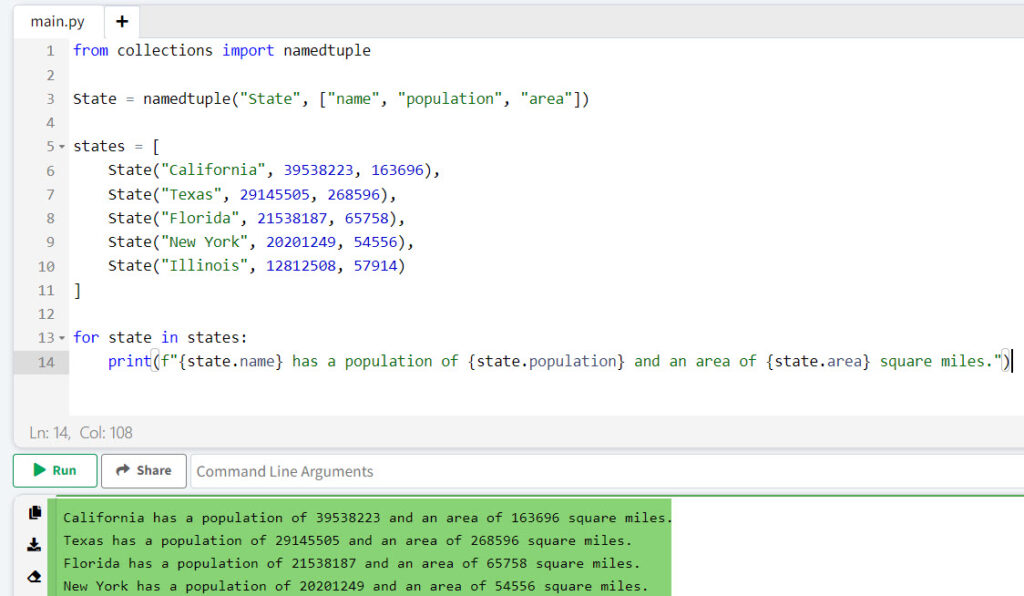
Consider a list of states with their populations and areas. We can use namedtuple to create a structured data type.
from collections import namedtuple

State = namedtuple("State", ["name", "population", "area"])

states = [
    State("California", 39538223, 163696),
    State("Texas", 29145505, 268596),
    State("Florida", 21538187, 65758),
    State("New York", 20201249, 54556),
    State("Illinois", 12812508, 57914)
]

for state in states:
    print(f"{state.name} has a population of {state.population} and an area of {state.area} square miles.")
In this example, namedtuple creates a State type with name, population, and area fields. The for loop iterates over the list of State objects, accessing their fields by name.
I executed the above code, and you can see the output in the screenshot below.
Conclusion
In this tutorial, I have explained how to create multiple variables in a for loop in Python using different methods with examples. Here are the methods:
- Basic for Loop with Multiple Variables
- Using enumerate()
- Using zip()
- Using List Comprehensions
- Using itertools.product
- Using collections.namedtuple() method
If you still have any questions, feel free to leave a comment below.
You may also like:

I’m Michelle Gallagher, a Senior Python Developer at Lumenalta based in New York, United States. I have over nine years of experience in the field of Python development, machine learning, and artificial intelligence. My expertise lies in Python and its extensive ecosystem of libraries and frameworks. Throughout my career, I’ve had the pleasure of working on a variety of projects that have leveraged my skills in Python and machine learning. Read more…