
When working with dates and times in Python, it is always best programming practice to check that the variables are of the correct type. The datetime module in Python provides classes for manipulating dates and times. In this tutorial, we’ll discuss various methods to check if a variable is of type datetime.datetime with examples.
To determine if a variable is of type datetime in Python, you can utilize the isinstance() function. This function checks if an object is an instance of a specified class. For instance, if you have a variable current_time, you can verify its type using isinstance(current_time, datetime). Here’s a quick example:
from datetime import datetime

current_time = datetime.now()
if isinstance(current_time, datetime):
    print("The variable is of type datetime.")
else:
    print("The variable is not of type datetime.")
If the check returns True, the variable is indeed a datetime object; otherwise, it is not.
Check Variable Type is datetime in Python
Now, let me show you how to check the variable type in datetime in Python using different methods.
Method 1: Using isinstance()
The isinstance() function is a built-in function in Python that checks if a variable type is datetime in Python. Let me show you two examples.
Example-1:
Here is a complete example to help you understand it better.
from datetime import datetime

# Creating a datetime object
current_time = datetime.now()

# Checking if the variable is of type datetime
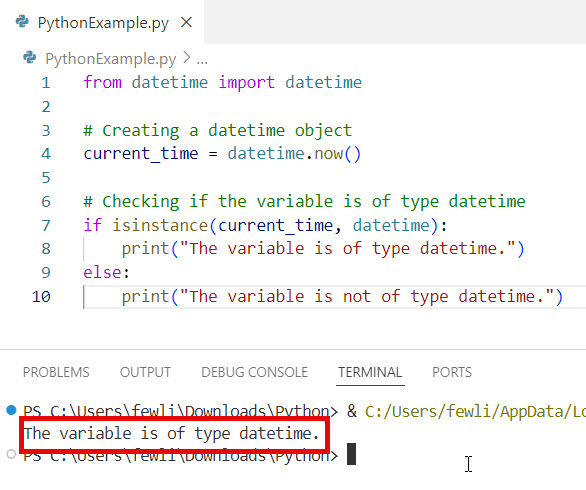
if isinstance(current_time, datetime):
    print("The variable is of type datetime.")
else:
    print("The variable is not of type datetime.")
I executed the above Python code and you can see the output in the screenshot below:
Example-2:
Let me show you another example.
In a logging system for a web application, ensuring that the timestamp is a datetime object is crucial for accurate logging.
from datetime import datetime

def log_event(event_time, event_description):
    if not isinstance(event_time, datetime):
        raise ValueError("event_time must be a datetime object")
    print(f"Event at {event_time}: {event_description}")

# Example usage
log_event(datetime.now(), "User logged in")
Check out How to Check if a Variable is a Number in Python?
Method 2: Using type()
The type() function returns the type of an object. You can compare this to the datetime class to check the type. The type() function can be used to check the variable type is datetime in Python. Let me show you two examples.
Example-1:
Here is a basic example:
from datetime import datetime

# Creating a datetime object
current_time = datetime.now()

# Checking if the variable is of type datetime
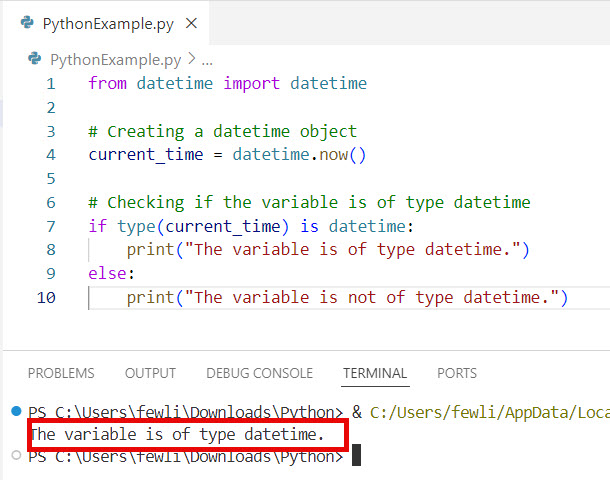
if type(current_time) is datetime:
    print("The variable is of type datetime.")
else:
    print("The variable is not of type datetime.")
I executed the above Python code, and you can see the output in the screenshot below:
Example-2:
Here is another real-time example.
When scheduling emails, it’s important to ensure that the scheduled time is a datetime object.
from datetime import datetime

def schedule_email(send_time, email_content):
    if type(send_time) is not datetime:
        raise ValueError("send_time must be a datetime object")
    print(f"Email scheduled to be sent at {send_time}: {email_content}")

# Example usage
schedule_email(datetime.now(), "Meeting reminder")
Check out How to Check if a Variable is a Float in Python?
Method 3: Using pandas with pd.to_datetime()
If you’re working with data frames in pandas, you can use pd.to_datetime() to ensure that a variable is converted to a datetime object. Here is an example.
Example-1:
Let me show you an example to help you understand it better.
import pandas as pd

# Creating a datetime object
date_str = "2027-10-06"
date_obj = pd.to_datetime(date_str)

# Checking if the variable is of type datetime
if isinstance(date_obj, pd.Timestamp):
    print("The variable is of type datetime.")
else:
    print("The variable is not of type datetime.")
Example-2:
Let me show you another real-time example to understand it better.
In an e-commerce setting, ensuring that the order dates are in datetime format is crucial for analyzing sales trends.
import pandas as pd

# Sample data
data = {
    'order_id': [1, 2, 3],
    'order_date': ["2027-10-01", "2027-10-02", "2027-10-03"]
}

df = pd.DataFrame(data)

# Convert order_date to datetime
df['order_date'] = pd.to_datetime(df['order_date'])

# Checking if the order_date column is of type datetime
if isinstance(df['order_date'][0], pd.Timestamp):
    print("The order_date column is of type datetime.")
else:
    print("The order_date column is not of type datetime.")
Read How to Check Variable Type is Boolean in Python?
Method 4: Using dateutil.parser
The dateutil library provides powerful extensions to the datetime module, allowing you to parse date strings into datetime objects in Python.
Let me show you two examples of this.
Example-1:
Here is a basic example.
from dateutil.parser import parse

# Creating a datetime object from a string
date_str = "2027-10-06"
date_obj = parse(date_str)

# Checking if the variable is of type datetime
if isinstance(date_obj, datetime):
    print("The variable is of type datetime.")
else:
    print("The variable is not of type datetime.")
Example-2:
Here is an advanced example.
In financial applications, ensuring that transaction dates are in datetime format is essential for accurate record-keeping.
from dateutil.parser import parse

def process_transaction(transaction_date, amount):
    if not isinstance(transaction_date, datetime):
        raise ValueError("transaction_date must be a datetime object")
    print(f"Transaction processed on {transaction_date}: Amount ${amount}")

# Example usage
transaction_date = parse("2023-10-06")
process_transaction(transaction_date, 100.50)
Conclusion
In this Python tutorial, we explored various methods to check if a variable is of type datetime in Python, including isinstance(), type(), pandas, and dateutil.parser. I explained each method with two different examples. Still have questions? Feel free to leave a comment below.
You may also like:

I’m Michelle Gallagher, a Senior Python Developer at Lumenalta based in New York, United States. I have over nine years of experience in the field of Python development, machine learning, and artificial intelligence. My expertise lies in Python and its extensive ecosystem of libraries and frameworks. Throughout my career, I’ve had the pleasure of working on a variety of projects that have leveraged my skills in Python and machine learning. Read more…