
Recently, while I was giving a Python session at the New York local user group, someone asked me how to check if the variable type is string in Python. I explained to them different methods with examples. In this tutorial, I will show you how to check type of variable is string in Python.
To check if a variable is a string in Python, you can use the isinstance() function. This built-in function checks if an object is an instance or subclass of a specified class. For example, if you have a variable city and you want to verify it’s a string, you would use isinstance(city, str).
city = "San Francisco"
if isinstance(city, str):
    print("The variable is a string.")
else:
    print("The variable is not a string.")
This code will output “The variable is a string.” if city is indeed a string. Using isinstance() ensures your type checks are accurate and your code remains robust and error-free.
Check Type of Variable Is String in Python
When working with strings in Python, it is very important to ensure a variable is a string before performing string-specific operations. This can prevent errors and improve code reliability.
Python provides different methods to check.
Method 1: Using isinstance()
The isinstance() function is a built-in Python function that checks if an object is an instance or subclass of a class. This is the recommended way to check for string types in Python.
Let me show you a real example to help you understand it better.
Let’s say we are working with a list of city names in the USA, and we want to ensure each entry is a string:
cities = ["New York", "Los Angeles", "Chicago", 12345, "Houston"]

for city in cities:
    if isinstance(city, str):
        print(f"{city} is a string.")
    else:
        print(f"{city} is not a string.")
Output:
New York is a string.
Los Angeles is a string.
Chicago is a string.
12345 is not a string.
Houston is a string.
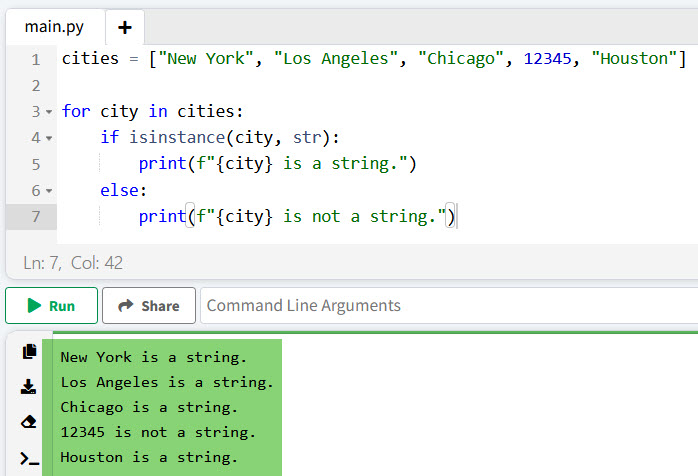
In this example, isinstance(city, str) checks if each city is a string and prints the appropriate message.
I executed the above Python code, and you can see the output in the screenshot below:
Read How to Check the Type of a Variable in Python?
Method 2: Using type()
Another method to check if a variable is a string is by using the type() function in Python. This function returns the type of the object passed to it. You can then compare it with the str type.
Here is an example to help you understand it better.
Consider a scenario where we have a list of state abbreviations, and we need to validate their types:
states = ["CA", "TX", "NY", 100, "FL"]

for state in states:
    if type(state) is str:
        print(f"{state} is a string.")
    else:
        print(f"{state} is not a string.")
Output:
CA is a string.
TX is a string.
NY is a string.
100 is not a string.
FL is a string.
Here, type(state) is str performs the check to see if state is of type str.
Here is the output you can see in the screenshot below:

Method 3: Using str Class Directly
You can also use the str class directly to check if a variable is a string in Python. Here is an example.
Suppose you are processing a list of ZIP codes and want to ensure they are all strings. Then, you can write the Python code below.
zip_codes = ["90210", "10001", 60614, "94109"]

for zip_code in zip_codes:
    if isinstance(zip_code, str):
        print(f"{zip_code} is a string.")
    else:
        print(f"{zip_code} is not a string.")
Output:
90210 is a string.
10001 is a string.
60614 is not a string.
94109 is a string.
Using isinstance(zip_code, str) ensures we are correctly identifying string types.
You can see the output in the screenshot below after I executed the above Python code.

Here, I have explained how to check the type of a variable is a string in Python using different methods with examples.
I hope this helps you!
You may also like:
- How to Check if a Variable is None in Python?
- How to Check if a Variable is Defined in Python?
- How to Check if a Variable Exists in Python?
- How to Check Variable Type is Boolean in Python?

I’m Michelle Gallagher, a Senior Python Developer at Lumenalta based in New York, United States. I have over nine years of experience in the field of Python development, machine learning, and artificial intelligence. My expertise lies in Python and its extensive ecosystem of libraries and frameworks. Throughout my career, I’ve had the pleasure of working on a variety of projects that have leveraged my skills in Python and machine learning. Read more…