
When developing in Python, verifying whether a variable is a number is often necessary. Python provides several ways to check if a variable is a number. In this tutorial, I will show you different methods to check if a variable is a number in Python, along with examples and complete code.
To check if a variable is a number in Python using the isinstance() function, you can simply use the following code snippet: isinstance(variable, (int, float)). This checks if the variable is either an integer or a float. For example, isinstance(42, (int, float)) will return True, confirming that 42 is a number.
Check if a Variable is a Number in Python
Now, let me show you how to check if a variable is a number in Python using different methods.
Method 1: Using isinstance()
The isinstance() function is a built-in Python function that checks if a variable is a number in Python. This method can be used to check for multiple types at once.
Example-1:
Let me show you a few examples, starting with a basic example.
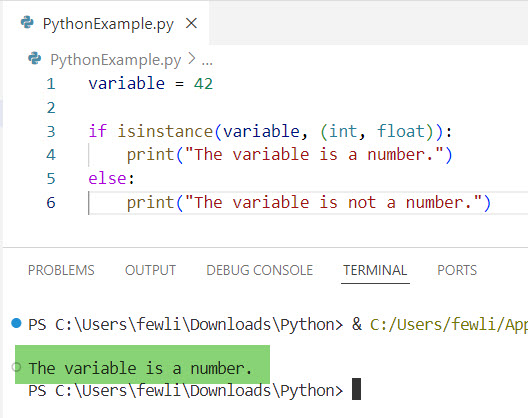
variable = 42

if isinstance(variable, (int, float)):
    print("The variable is a number.")
else:
    print("The variable is not a number.")
I executed the above Python code, and you can see the output in the screenshot below:
Now, let me show you another real-time example.
Suppose you are developing a temperature conversion app that converts Fahrenheit to Celsius. Before performing the conversion, you need to ensure that the user input is a number.
user_input = input("Enter the temperature in Fahrenheit: ")

try:
    temperature = float(user_input)
    if isinstance(temperature, (int, float)):
        celsius = (temperature - 32) * 5.0/9.0
        print(f"The temperature in Celsius is {celsius:.2f}")
except ValueError:
    print("Invalid input. Please enter a numeric value.")
Check out How to Check if a Variable is a Float in Python?
Method 2: Using type()
The type() function returns the type of an object. You can use the type() method to check if a variable is a number in Python.
Example-1:
Now, let me show you a simple example.
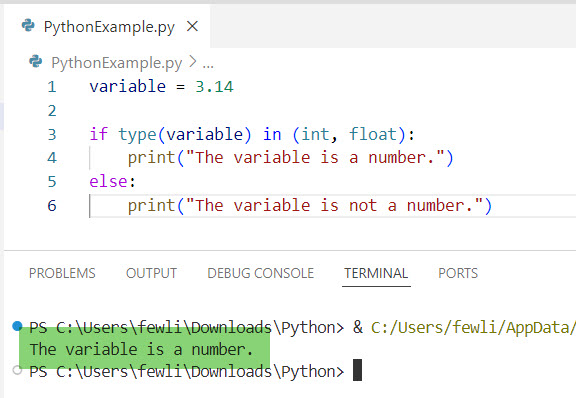
variable = 3.14

if type(variable) in (int, float):
    print("The variable is a number.")
else:
    print("The variable is not a number.")
You can see the output in the screenshot below after I executed the above Python code.
Example-2:
Here is another real-time example to help you understand it better.
Suppose you are building a system to check if a user is eligible to vote in the USA. You need to ensure the age entered is a number.
age_input = input("Enter your age: ")

try:
    age = int(age_input)
    if type(age) == int:
        if age >= 18:
            print("You are eligible to vote.")
        else:
            print("You are not eligible to vote.")
except ValueError:
    print("Invalid input. Please enter a numeric value.")
Read How to Check Variable Type is Boolean in Python?
Method 3: Using isnumeric(), isdigit(), and isdecimal()
These string methods can be used to check if a string represents a number in Python. Note that they work only for strings and do not recognize floating-point numbers or negative values.
Let me show you how to use methods like isnumeric(), isdigit(), and isdecimal() to check if a variable is a number in Python.
Example-1:
Here is a basic example.
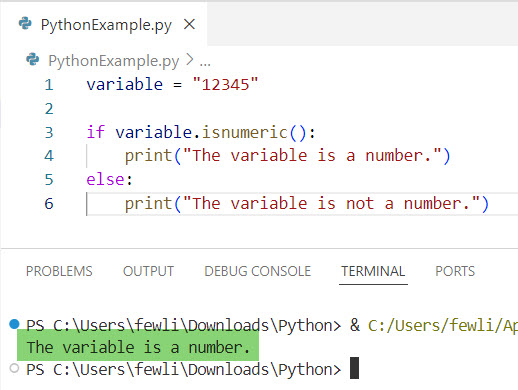
variable = "12345"

if variable.isnumeric():
    print("The variable is a number.")
else:
    print("The variable is not a number.")
You can see the output in the screenshot below:
Example-2:
Now, let me show you another real-time example to help you understand better.
In the USA, ZIP codes are numeric and typically five digits long. These methods can be used to check if the input is a valid ZIP code.
zip_code = input("Enter your ZIP code: ")

if zip_code.isdigit() and len(zip_code) == 5:
    print("Valid ZIP code.")
else:
    print("Invalid ZIP code. Please enter a 5-digit numeric value.")
Read Check Type of Variable Is String in Python
Method 4: Using Regular Expressions
Regular expressions offer a powerful way to validate numbers, including integers and floating-point numbers in Python.
Now, let me show you some examples.
Example-1:
Here is a basic example to help you understand it better.
import re

variable = "123.45"
pattern = r'^\d+(\.\d+)?$'

if re.match(pattern, variable):
    print("The variable is a number.")
else:
    print("The variable is not a number.")
Example-2:
Here is another real-time example to help you understand it better.
Suppose you are developing a financial application that requires users to input dollar amounts. You can use regular expressions to validate the input.
import re

dollar_amount = input("Enter the dollar amount: ")
pattern = r'^\d+(\.\d{2})?$'

if re.match(pattern, dollar_amount):
    print("Valid dollar amount.")
else:
    print("Invalid dollar amount. Please enter a numeric value with up to two decimal places.")
Conclusion
In this tutorial, I have explained how to check if a variable is a number in Python using different methods such as: isinstance(), type(), isnumeric(), isdigit(), and isdecimal(), Regular Expressions, etc. I hope the above examples will be helpful to you.
You may also like the following tutorials:
- How to Check the Type of a Variable in Python?
- How to Check if a Variable is None in Python?
- How to Check Variable Type is datetime in Python?
- How to Change the Value of a Variable in Python?

I’m Michelle Gallagher, a Senior Python Developer at Lumenalta based in New York, United States. I have over nine years of experience in the field of Python development, machine learning, and artificial intelligence. My expertise lies in Python and its extensive ecosystem of libraries and frameworks. Throughout my career, I’ve had the pleasure of working on a variety of projects that have leveraged my skills in Python and machine learning. Read more…