
Today, I will explain another useful concept related to functions for Python developers. In this tutorial, I will show you how to call a function from another file in Python with examples. I will show you various methods to call a function from another file in Python.
To call a function from another file in Python, you can use the import statement. First, create a file with the desired function, for example, helper.py with a function greet(name). Next, in your main file, use from helper import greet to import the function. You can then call the function directly, like print(greet("Alice")), which will output “Hello, Alice!”.
Call a Function from Another File in Python
There are many reasons you might call a function from another file in Python. You can place commonly used functions in a separate file and easily reuse them in different parts of your project. Also, when working in a team, having separate files for different functionalities allows multiple developers to work on different parts of the project simultaneously.
Now, let me show you how to call a function from another file in Python.
Basic Syntax
The basic syntax to call a function from another file in Python is by using the import statement. Here’s a simple example to understand this:
Let me show you an example.
- Create the Function File: Let’s create a file named
helper.pywith a simple function.
# helper.py
def greet(name):
return f"Hello, {name}!"- Import and Call the Function: Now, create another file named
main.pywhere we will import and call thegreetfunction.
# main.py
from helper import greet

name = "Alice"
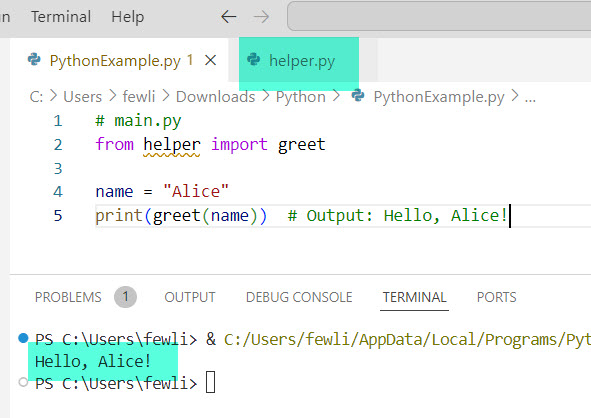
print(greet(name))  # Output: Hello, Alice!
In this example, we used the from ... import syntax to import the greet function from helper.py.
You can see in the screenshot below that I executed the above code using VS code.
Check out Pass a Function as an Argument in Python
Let me show you a few other methods to call functions from another file in Python.
1. Using import Statement
The best way to call a function from another file is by using the import statement. This method allows you to import specific functions or entire modules.
Import Specific Functions
Here is the code to import specific functions in Python.
# main.py
from helper import greet

print(greet("Alice"))
Import the Entire Module
Here is the complete code to import the entire module in Python.
# main.py
import helper

print(helper.greet("Alice"))
Check out Repeat a Function in Python
2. Using importlib Library
You can use the importlib library to import a module during runtime for more dynamic needs. This is particularly useful when the module name is not known until runtime.
Here is the complete Python code.
# main.py
import importlib

module_name = "helper"
helper = importlib.import_module(module_name)

print(helper.greet("Alice"))
I executed the above Python code using VS code, and you can see the output in the screenshot below:

3. Using exec Function
The exec function can execute Python code dynamically, allowing you to call functions from another file. However, this method is less secure and generally not recommended for production code.
You can see the Python code to call a function from another file.
# main.py
exec(open("helper.py").read())

print(greet("Alice"))
Conclusion
You can call functions from another file in Python by using the import statement, importlib library, or even the exec function, etc. I hope this guide has given you a clear understanding of how to call a function from another file in Python.
You may also like:
- How to Call the Main Function in Python?
- Run a Python Function from the Command Line
- Python Function Return Types

I’m Michelle Gallagher, a Senior Python Developer at Lumenalta based in New York, United States. I have over nine years of experience in the field of Python development, machine learning, and artificial intelligence. My expertise lies in Python and its extensive ecosystem of libraries and frameworks. Throughout my career, I’ve had the pleasure of working on a variety of projects that have leveraged my skills in Python and machine learning. Read more…