
As a Python programmer, you should know how to use the append() function. In this tutorial, I will explain how to use the append() function in Python with examples.
The append function in Python is a built-in list method used to add a single element to the end of a list. Its syntax is: list_name.append(element), where list_name is your list and element is the item you want to add. This method modifies the original list in place and is highly efficient, performing the operation in constant time, O(1). For example, if you have a list of cities like cities = [“New York”, “Los Angeles”, “Chicago”], you can add “Houston” by calling cities.append(“Houston”), resulting in [“New York”, “Los Angeles”, “Chicago”, “Houston”].
What is the append() Function in Python?
The append function in Python is a built-in method used to add a single element to the end of a list. This function modifies the original list in place, increasing its length by one. It’s an incredibly useful method when you need to add elements to a list during runtime dynamically.
Syntax of the append() Function
The syntax of the append function in Python is:
list_name.append(element)Here, list_name is the name of your list, and element is the item you want to add to the end of the list.
The append function is part of the list methods in Python. When you call list_name.append(element), the specified element is added to the end of the list list_name. This operation is performed in constant time, O(1), making it very efficient.
Python append() Function Examples
Let’s look at some practical examples to understand how Python’s append() function works.
Example 1: Add a Single Element to a List
Suppose you have a list of cities in the USA, and you want to add another city to this list. Here’s how you can do it:
cities = ["New York", "Los Angeles", "Chicago"]
cities.append("Houston")
print(cities)
Output:
['New York', 'Los Angeles', 'Chicago', 'Houston']In this example, the city “Houston” is appended to the end of the cities list.
Here is the exact output in the screenshot below:

Check out ord() function in Python
Example 2: Append Elements in a Loop
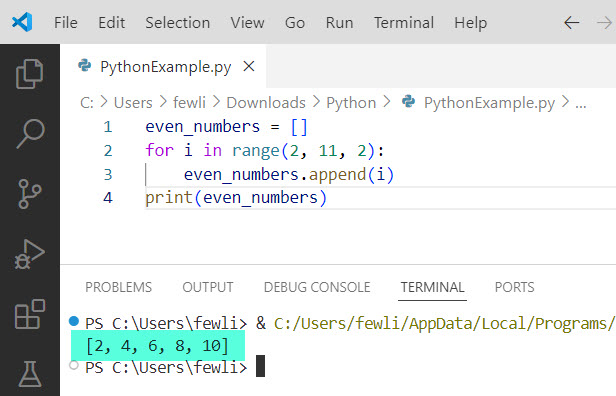
You can also use the append function inside a loop to add multiple elements dynamically. For instance, let’s create a list of even numbers; here is the complete Python code.
even_numbers = []
for i in range(2, 11, 2):
    even_numbers.append(i)
print(even_numbers)
Output:
[2, 4, 6, 8, 10]Here, we used a for loop to append even numbers from 2 to 10 to the even_numbers list.
Here is the exact output in the screenshot below:
Example 3: Append Different Data Types
The append function is not limited to appending elements of the same type. You can append different data types to a list in Python:
mixed_list = [1, "Apple", 3.14]
mixed_list.append(True)
print(mixed_list)
Output:
[1, 'Apple', 3.14, True]In this example, we appended a boolean value True to a list containing an integer, a string, and a float.
Check out POP() Function in Python
Example 4: Append Lists to Lists
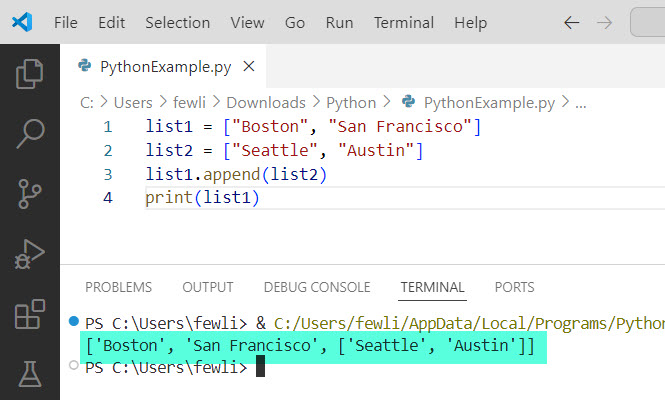
You can also append an entire list to another list in Python using the append() method. However, this will add the list as a single element, not merge the two lists. Here’s an example:
list1 = ["Boston", "San Francisco"]
list2 = ["Seattle", "Austin"]
list1.append(list2)
print(list1)
Output:
['Boston', 'San Francisco', ['Seattle', 'Austin']]If you want to merge the lists, you should use the extend method instead of append.
Here is the output in the screenshot below:
Check out COUNT() Function in Python
Example 5: Using append with Conditional Statements
You can use the append function with conditional statements to add elements based on certain conditions in Python. For example, let’s create a list of cities that start with the letter ‘S’:
all_cities = ["San Diego", "New York", "San Jose", "Dallas"]
s_cities = []

for city in all_cities:
    if city.startswith("S"):
        s_cities.append(city)

print(s_cities)
Output:
['San Diego', 'San Jose']In this example, we used an if statement to check if a city’s name starts with ‘S’ before appending it to the s_cities list.
I executed the above Python code using VS code, and you can see the output in the screenshot below:

Conclusion
The append function in Python allows you to add elements dynamically and efficiently. In this tutorial, I explained how to use the append() method in Python with a few real examples.
You may also like the following tutorials:
- Sum() Function in Python
- Strip() Function in Python
- MAX() Function in Python
- Average() Function in Python

I’m Michelle Gallagher, a Senior Python Developer at Lumenalta based in New York, United States. I have over nine years of experience in the field of Python development, machine learning, and artificial intelligence. My expertise lies in Python and its extensive ecosystem of libraries and frameworks. Throughout my career, I’ve had the pleasure of working on a variety of projects that have leveraged my skills in Python and machine learning. Read more…