
Recently, I received a query regarding how to check if an environment variable exists in Python. This is a little tricky, but there are different ways to do it. In this tutorial, I have explained how to check if an environment variable exists in Python.
To check if an environment variable exists in Python, you can use the os.getenv() method. This method returns the value of the specified environment variable if it exists, or None if it does not. For example, db_url = os.getenv('DATABASE_URL') will assign the value of the DATABASE_URL environment variable to db_url if it exists, otherwise db_url will be None.
What Are Python Environment Variables?
Environment variables allow you to configure applications without hardcoding values into your source code. This makes your code more secure and easier to manage across different environments, such as development, testing, and production. Environment variables are important in configuring applications, especially when it comes to managing sensitive information like API keys, database credentials, and other configuration settings.
Check if an Environment Variable Exists in Python
Now, let me check if an environment variable exists in Python using different methods.
1. Using os.getenv()
The os.getenv() method is the best way to check if an environment variable exists in Python. It returns the value of the environment variable if it exists; otherwise, it returns None or a default value if specified.
Example:
Here is an example.
import os

# Check if 'DATABASE_URL' exists
db_url = os.getenv('DATABASE_URL')

if db_url:
    print(f"Database URL: {db_url}")
else:
    print("DATABASE_URL environment variable is not set.")
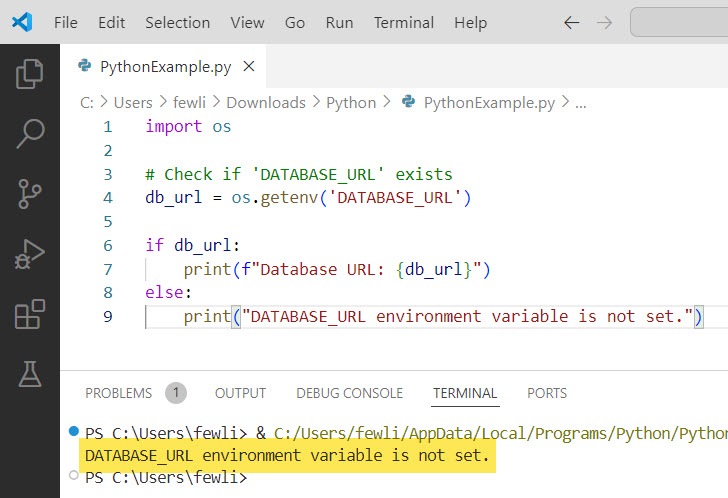
In this example, we check for the existence of the DATABASE_URL environment variable. If it exists, its value is printed; otherwise, a message is displayed indicating that the variable is not set.
I executed the above Python code, and you can see the output in the screenshot below:
Check out Check if a Variable is an Integer or String in Python
2. Using os.environ.get()
Another method is to use os.environ.get() to check if an environment variable exists in Python, which is quite similar to os.getenv(). It also returns the value of the environment variable if it exists, or None if it does not.
Example:
Let me show you an example.
import os

# Check if 'API_KEY' exists
api_key = os.environ.get('API_KEY')

if api_key:
    print(f"API Key: {api_key}")
else:
    print("API_KEY environment variable is not set.")
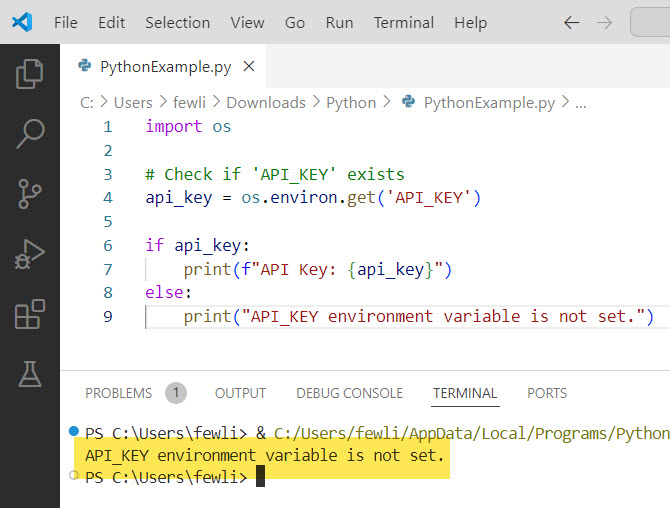
This method is functionally identical to os.getenv() and can be used interchangeably.
You can see the output in the screenshot below:
3. Using os.environ Dictionary
The os.environ dictionary contains all the environment variables. You can directly check if a key exists in this dictionary. Here is a Python program to check it out.
Example:
import os

# Check if 'SECRET_KEY' exists
if 'SECRET_KEY' in os.environ:
    print(f"Secret Key: {os.environ['SECRET_KEY']}")
else:
    print("SECRET_KEY environment variable is not set.")
This method is useful if you need to perform multiple checks or operations on environment variables, as you can treat os.environ like a regular dictionary.
Check out Print Variable Name Instead of Value in Python
Python: Check If Environment Variable Exists: Examples
Now, let me show you two real-time examples of how to check if an environment variable exists in Python.
Example 1: Configuring a Flask Application
Flask is a popular web framework in Python. You often need to configure it using environment variables for settings like the secret key, database URL, and debug mode.
from flask import Flask
import os

app = Flask(__name__)

# Set the secret key to a random value
app.config['SECRET_KEY'] = os.getenv('SECRET_KEY', 'default_secret_key')

# Set the database URI
app.config['SQLALCHEMY_DATABASE_URI'] = os.getenv('DATABASE_URL', 'sqlite:///default.db')

# Enable debug mode based on environment variable
app.config['DEBUG'] = os.getenv('FLASK_DEBUG', 'False').lower() in ['true', '1', 't']

if __name__ == '__main__':
    app.run()
In this example, we configure a Flask application using environment variables. If the variables are not set, default values are used.
Example 2: Connecting to an External API
When connecting to an external API, you often need to use an API key stored in an environment variable. Here is the complete Python code.
import requests
import os

api_key = os.getenv('API_KEY')

if not api_key:
    raise ValueError("API_KEY environment variable is not set.")

response = requests.get('https://api.example.com/data', headers={'Authorization': f'Bearer {api_key}'})

if response.status_code == 200:
    print("Data fetched successfully!")
else:
    print(f"Failed to fetch data. Status code: {response.status_code}")
In this example, we fetch data from an external API using an API key stored in an environment variable. If the API key is not set, an error is raised.
Conclusion
In this tutorial, I have explained how to check if an environment variable exists in Python using different methods: using os.getenv(), os.environ.get(), or the os.environ dictionary, etc.
Also, I have shown you two examples related to this.
You may also like:

I’m Michelle Gallagher, a Senior Python Developer at Lumenalta based in New York, United States. I have over nine years of experience in the field of Python development, machine learning, and artificial intelligence. My expertise lies in Python and its extensive ecosystem of libraries and frameworks. Throughout my career, I’ve had the pleasure of working on a variety of projects that have leveraged my skills in Python and machine learning. Read more…