
While doing some programming, I got a requirement to check if a variable is an integer in Python. I tried different methods. In this tutorial, I will show you different methods to determine whether a variable is an integer, along with practical examples.
To check if a variable is an integer in Python, you can use the isinstance() function. This function takes two arguments: the variable you want to check and the data type you want to compare it against. If the variable is an integer, isinstance() will return True; otherwise, it will return False. For example, isinstance(25, int) will return True, while isinstance("John", int) will return False.
Method 1: Using the isinstance() Function
The most straightforward way to check if a variable is an integer in Python is by using the built-in isinstance() function. This function takes two arguments: the variable you want to check and the data type you want to compare it against. The isinstance() function takes two arguments.
Let me show you an example.
Example:
age = 25
print(isinstance(age, int))  # Output: True

name = "John"
print(isinstance(name, int))  # Output: False
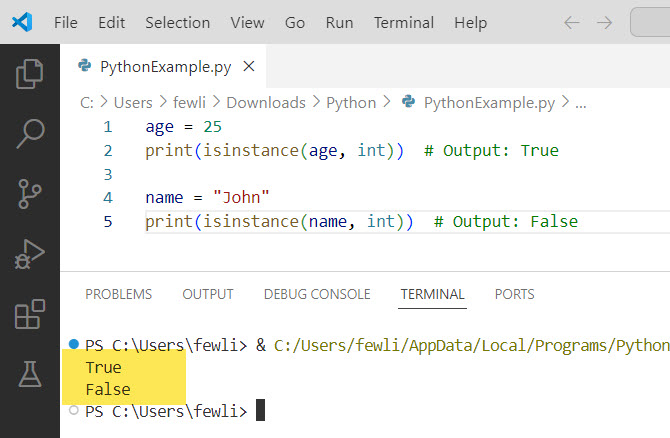
In this example, we have two variables: age, which is an integer, and name, which is a string. When we use isinstance() to check if age is an integer, it returns True. On the other hand, when we check if name is an integer, it returns False.
You can see the output in the screenshot below:
Check out How to Initialize an Empty Variable in Python?
Method 2: Using the type() Function
Another way to check if a variable is an integer is by using the type() function in Python. This function returns the data type of the given variable.
Let me show you an example to help you understand it better.
Example:
zip_code = 90210
print(type(zip_code) == int)  # Output: True

city = "Los Angeles"
print(type(city) == int)  # Output: False
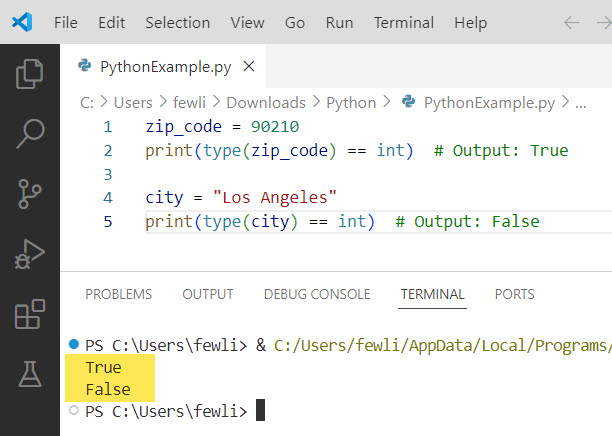
Here, we have a variable zip_code that represents a USA zip code, which is an integer. We use type() to check if the type of zip_code is equal to int, and it returns True. Similarly, when we check the type of the city variable, which is a string, it returns False.
I executed the above Python code and you can see the output in the screenshot below:
Method 3: Using the isdigit() Method
If you have a string variable and want to check if it contains only digits (and thus can be converted to an integer), you can use the isdigit() method. Python offers isnumeric() method that checks whether a string is an integer or not. This method is similar to the isdigit() method.
Example:
ssn = "123456789"
print(ssn.isdigit())  # Output: True

phone_number = "555-123-4567"
print(phone_number.isdigit())  # Output: False
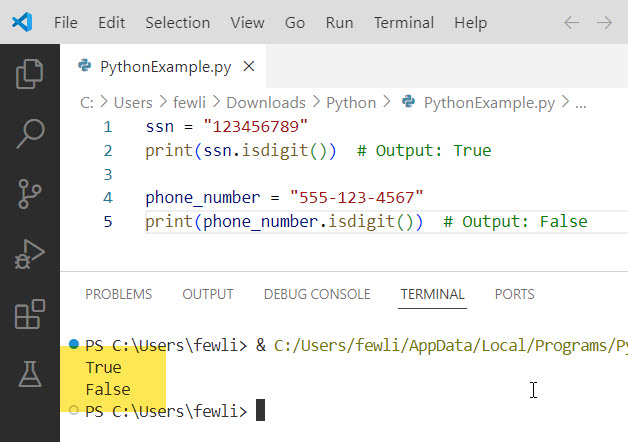
In this example, we have a variable ssn that represents a USA Social Security Number, which consists of only digits. When we call the isdigit() method on ssn, it returns True. However, when we call isdigit() on phone_number, which contains hyphens, it returns False.
Here is the output in the screenshot below:
Read Multiply a Variable in Python
Method 4: Using a Try-Except Block
You can also use a try-except block to attempt to convert a variable to an integer and catch any potential errors. This way, you can check if a variable is an integer in Python using a try-except block.
Example:
Here is an example.
postal_code = "12345"
try:
    postal_code = int(postal_code)
    print("The postal code is an integer.")
except ValueError:
    print("The postal code is not an integer.")
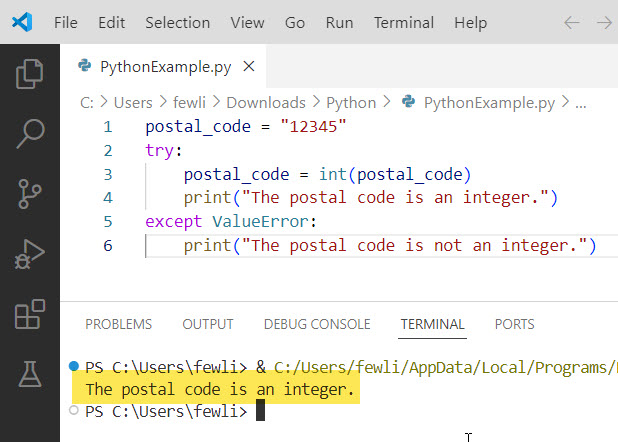
In this example, we have a variable postal_code that represents a USA postal code. We try to convert it to an integer using int(). If the conversion succeeds, we print a message stating that the postal code is an integer. If a ValueError occurs during the conversion, we catch the exception and print a message indicating that the postal code is not an integer.
You can see the exact output in the screenshot below:
Conclusion
Python provides several methods to check if a variable is an integer. You can use the isinstance() function, the type() function, the isdigit() method for strings, or a try-except block to handle potential conversion errors. By checking if a variable is an integer, you can ensure your Python code behaves as expected and avoid potential errors. I hope this helps to you, do let me know in the comments below if you still have any questions.
You may also like the following tutorials:
- Call a Variable from Another Function in Python
- Print a New Line After a Variable in Python
- Insert Variables into Strings in Python

I’m Michelle Gallagher, a Senior Python Developer at Lumenalta based in New York, United States. I have over nine years of experience in the field of Python development, machine learning, and artificial intelligence. My expertise lies in Python and its extensive ecosystem of libraries and frameworks. Throughout my career, I’ve had the pleasure of working on a variety of projects that have leveraged my skills in Python and machine learning. Read more…